
一、实验运行环境
1.1 主机操作系统
1.1.1 Window 10上运行Centos8(VMware虚拟机)
1.2 网络设备
1.2.1 Ensp模拟器上运行的华为三层交换机Quidway S5700-28C-HI
1.3 网络设备OS版本
1.3.1 华为IOS
1.4 Python版本
1.4.1 2
二、实验拓扑

三、实验所用地址
3.1 局域网IP段
3.1.1 0/24
3.2 运行Python的Centos主机
3.2.1 20/24
3.3 SW1
3.3.1 11/24
3.4 SW2
3.4.1 12/24
3.5 SW3
3.5.1 23/24
注意:实验环境必须要在同一网段,这里用不同地址代表不同网段
四、实验目的
4.1 在不借助任何第三方NMS软件或网络安全工具帮助的前提下,使用Python脚本确定当前有哪些交换机可达(需要记录运行脚本的时间,要求精确到年月日和时分秒),并且统计当前每个交换机有多少用户端的物理端口是UP的(级联端口不算),以及所有交换机UP的用户端物理端口的总数,并统计网络中的端口使用率(也就是物理端口的Up率)
五、实验准备
5.1 创建一个名为reachable_ip.txt的文本文件,其中包含需要测试的设备的管理IP地址

注:文件中包含5个IP地址,其中三个正常,两个目的不可达
六、实验思路
6.1 创建一个名为reachable_ip.txt的文本文件,其中包含需要测试的设备的管理IP地址
6.2 读取文本文件里管理地址登录交换机,输入命令'display int bri | include up'查看哪些端口是UP的
6.3 通过正则表达式(re模块),在回显内容匹配我们所要的用户物理端口号
6.4 统计每台交换机UP端口数量以及所有交换机的端口总数
6.5 将统计到的信息添加到以执行脚本时间开头的文本文件中
七、实验步骤
7.1 每台交换机提前配好SSH,这里不做过多描述,如有需要请参考SSH配置实验
7.2 配置互联地址,并进行Ping测试,这里不做演示
7.3 建议提前手工远程登录交换机进行测试
7.4 在虚拟机上创建名为up_counts.py的脚本,具体操作如下
7.4.1 执行命令'vi up_counts.py'创建脚本
7.4.2 输入'i'进入编辑模式
7.4.3 编写脚本内容,如下
#通过import语句导入paramiko、time、re、socket、getpass、datetime模块
import paramiko
import time
import re
import socket
from getpass import getpass
from datetime import datetime

#交互的模式下输入用户名和密码
username = input("Username: ")
password = getpass("password: ")
#调用datetime.now()记录当前时间
now_time = datetime.now()
#调用datetime.now()下面的子方法.month()、.day()、.year()以字符串的形式展示并将其赋值给变量date,%s 可以将整数转成字符串
date = "%s-%s-%s" % (now_time.month,now_time.day,now_time.year)
#调用datetime.now()下面的子方法.hour()、.minute()、.second()以字符串的形式展示并将其赋值给变量time_now,(%在python的格式化输出,有转换字符的作用)
time_now = "%s:%s:%s" % (now_time.hour,now_time.minute,now_time.second)

#创建两个分别代表目的不可达、认证失败的空列表
switch_with_tacacs_issue = []
switch_not_reachable = []
#设置总端口数的初始值为0
total_number_of_up_port = 0

#以只读的形式打开名为eachable_ip.txt的文件并将其内容赋值给变量iplist
iplist = open('reachable_ip.txt', 'r')
#计算变量iplist的长度并将其赋值给变量number_of_switch
number_of_switch = len(iplist.readlines())
#计算所有交换机所有的端口号
total_number_of_ports = number_of_switch * 48

#将指针设置到开头处
iplist.seek(0)
#将变量里面的内容一一赋值给变量line
for line in iplist:
    try:
#将ip进行去除首尾空行处理
        ip = line.strip()
#调用Paramiko的SSHClient()方法,将其赋值给变量ssh_client
        ssh_client = paramiko.SSHClient()
#使用ssh_client.set_missing_host_key_policy(paramiko.AutoAddPolicy())来让Paramiko接受服务端提供的公钥
        ssh_client.set_missing_host_key_policy(paramiko.AutoAddPolicy())
#调用paramiko.SSHClient()的函数connect()进行SSH登录,look_for_keys=False用来解决避免Paramiko使用已存在密钥来登录设备
        ssh_client.connect(hostname=ip,username=username,password=password,look_for_keys=False)
#打印登录成功的提示信息
        print(f"You have successfully connect to {ip}!")
#调用Paramiko的SSHClient()的invoke_shell()方法来唤醒shell,即设备命令行
        command = ssh_client.invoke_shell()
#SSH登录成功后输入特权密码查看端口信息
        command.send("su\n")
        command.send(password + "\n")
        command.send("dis ip int bri | in up\n")
#调用time模块下的sleep()函数手动让Python休眠1秒
        time.sleep(1)
#设置命令行最大回显内容数并将其赋值给变量output并用decode("ascii")将其解析为ASCII编码
        output = command.recv(65535).decode('ascii')
        print(output)
#通过正则表达式findall()方法来查看UP的G口
        search_up_port = re.findall(r'GigabitEthernet', output)
#计算UP的G口的数量并将其赋值给变量number_of_up_port
        number_of_up_port = len(search_up_port)
#打印UP的G口的数量的提示信息
        print(f"{ip} has {int(number_of_up_port)} ports up.")
#每次查找UP的G口并统计,total_number_of_up_port = number_of_up_port + total_number_of_up_port
        total_number_of_up_port += number_of_up_port
#当不符合try语句则执行except语句,这里根据认证失败来执行except下面的语句
    except paramiko.ssh_exception.AuthenticationException:
#打印某个IP认证失败信息
        print(f"TACACS is not working for {ip}!")
#将认证失败的IP添加到一个描述认证失败的列表当中
        switch_with_tacacs_issue.append(ip)
#当不符合try语句则执行except语句,这里根据目的不可达来执行except下面的语句
    except socket.error:
#打印某个IP目的不可达信息
        print(f"{ip} is not reachable.")
#将目的不可达的IP添加到一个描述目的不可达的列表当中
        switch_not_reachable.append(ip)
#关闭文件
iplist.close()

#打印认证的IP
print("--------------------------------------")
print(f"There are totally {int(total_number_of_ports)} ports available in the network.")
print(f"{int(total_number_of_up_port)} ports are currently up.")
print(f"\nport up rate is {int(total_number_of_up_port) / int(total_number_of_ports) * 100} ")
print("\nTACACS is not working for below switches: ")
for i in switch_with_tacacs_issue:
    print(i)
#打印目的不可达的IP
print("\nBelow switches are not reachable: ")
for i in switch_not_reachable:
    print(i)
#以附加的模式打开名为date.txt的文件
f = open(date + ".txt", "a+")
#在文件填写记录的时间
f.write(f"As of {date} {time_now}")
#将上述信息一一写入文件中
f.write(f"\n\nThere are totally {int(total_number_of_ports)} ports available in the network.")
f.write(f"\n{int(total_number_of_up_port)} ports are currently up.")
f.write(f"\nport up rate is {int(total_number_of_up_port) / int(total_number_of_ports) * 100} ")
f.write("\n--------------------------------------------------\n\n")
#关闭文件
f.close()
7.4.4 执行命令'chmod +x up_counts.py'赋予脚本可执行权限
切记:不给权限执行脚本会报错
7.4.5 执行命令'python3.8 up_counts.py '跑脚本
7.4.6 跑完脚本结果如下:
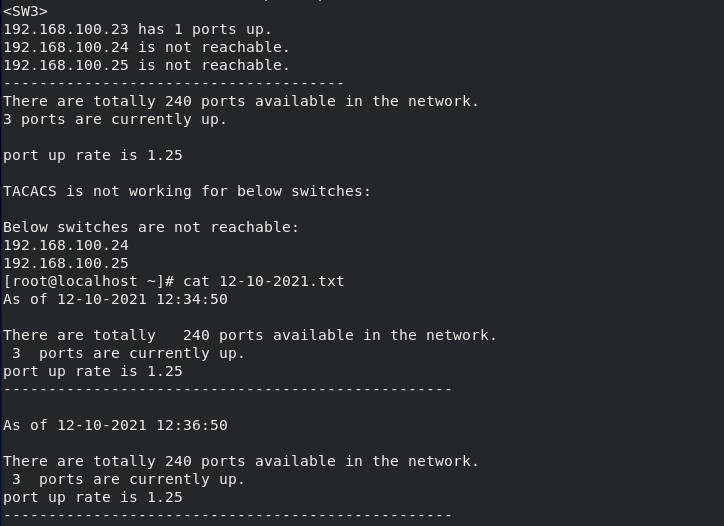
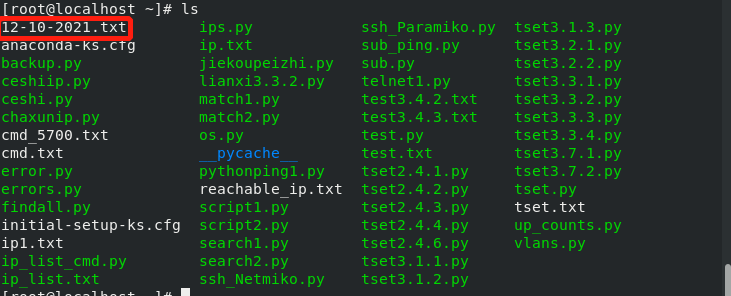
7.4.7 查看当前目录下是否以脚本运行时间开头的文本文件,发现存在说明脚本运行成功