
一、GitLab 部署
1.5.1 系统环境
- Gitlab版本:16.1.0
- Redis版本:6.2
- Postgresql版本:14.0
- Kubernetes版本:1.27.4
- Helm 安装方式:https://docs.gitlab.com/charts/installation/
1.5.2 部署服务
1、部署Redis
# 创建ns
[root@master01 4]# k create ns devops

# 编写yaml文件
[root@master01 4]# vim redis.yaml
kind: Service
apiVersion: v1
metadata:
  name: redis
  namespace: devops
  labels:
    name: redis
spec:
  type: ClusterIP
  ports:
    - name: redis
      protocol: TCP
      port: 6379
      targetPort: redis
  selector:
    name: redis
---
apiVersion: v1
kind: PersistentVolumeClaim
metadata:
  name: redis-data
  namespace: devops
  labels:
    app: redis
spec:
  storageClassName: nfs-storage
  accessModes:
    - ReadWriteOnce
  resources:
    requests:
      storage: 5Gi
---
kind: Deployment
apiVersion: apps/v1
metadata:
  name: redis
  namespace: devops
  labels:
    name: redis
spec:
  replicas: 1
  selector:
    matchLabels:
      name: redis
  template:
    metadata:
      name: redis
      labels:
        name: redis
    spec:
      containers:
      - name: redis
        image: registry.cn-hangzhou.aliyuncs.com/abroad_images/redis:6.2
        ports:
        - name: redis
          containerPort: 6379
          protocol: TCP
        volumeMounts:
          - name: redis-persistent-storage
            mountPath: /var/lib/redis
        livenessProbe:
          exec:
            command:
              - redis-cli
              - ping
          initialDelaySeconds: 5
          timeoutSeconds: 5
          periodSeconds: 10
          successThreshold: 1
          failureThreshold: 3
        readinessProbe:
          exec:
            command:
              - redis-cli
              - ping
          initialDelaySeconds: 5
          timeoutSeconds: 5
          periodSeconds: 10
          successThreshold: 1
          failureThreshold: 3
      volumes:
      - name: redis-persistent-storage
        persistentVolumeClaim:
          claimName: redis-data

# 应用
[root@master01 4]# kaf redis.yaml

# 查看
[root@master01 4]# kg po,pvc,svc   -n devops -owide
NAME                              READY   STATUS    RESTARTS      AGE   IP               NODE       NOMINATED NODE   READINESS GATES
pod/controller-6b44dbf99b-8mh9x   1/1     Running   2 (39m ago)   13h   172.21.231.146   node02     <none>           <none>
pod/redis-5754445ff7-69xhw        1/1     Running   0             24s   172.29.55.25     node01     <none>           <none>
pod/speaker-5wdxx                 1/1     Running   1 (40m ago)   13h   10.0.0.63        master02   <none>           <none>
pod/speaker-clbss                 1/1     Running   1 (40m ago)   13h   10.0.0.61        node01     <none>           <none>
pod/speaker-fg2xk                 1/1     Running   1 (40m ago)   13h   10.0.0.62        node02     <none>           <none>
pod/speaker-jww4m                 1/1     Running   1 (40m ago)   13h   10.0.0.64        master03   <none>           <none>
pod/speaker-spqks                 1/1     Running   1 (40m ago)   13h   10.0.0.60        master01   <none>           <none>

NAME                               STATUS   VOLUME                                     CAPACITY   ACCESS MODES   STORAGECLASS   AGE   VOLUMEMODE
persistentvolumeclaim/redis-data   Bound    pvc-9e29d43d-7755-4df9-9e23-6ac8a3d928c4   5Gi        RWO            nfs-storage    24s   Filesystem

NAME                      TYPE        CLUSTER-IP        EXTERNAL-IP   PORT(S)    AGE   SELECTOR
service/redis             ClusterIP   192.168.181.187   <none>        6379/TCP   24s   name=redis
service/webhook-service   ClusterIP   192.168.9.73      <none>        443/TCP    13h   component=controller
2、部署postgresql.yaml
# 编写yaml文件
[root@master01 4]# vim postgresql.yaml
apiVersion: v1
kind: PersistentVolumeClaim
metadata:
  name: postgresql-data
  namespace: devops
spec:
  storageClassName: nfs-storage
  accessModes:
  - ReadWriteOnce
  resources:
    requests:
      storage: 20Gi
---
kind: Service
apiVersion: v1
metadata:
  name: postgresql
  namespace: devops
  labels:
    name: postgresql
spec:
  ports:
    - name: postgres
      protocol: TCP
      port: 5432
      targetPort: postgres
  selector:
    name: postgresql
  type: ClusterIP
---
kind: Deployment
apiVersion: apps/v1
metadata:
  name: postgresql
  namespace: devops
  labels:
    name: postgresql
spec:
  replicas: 1
  selector:
    matchLabels:
      name: postgresql
  template:
    metadata:
      name: postgresql
      labels:
        name: postgresql
    spec:
      containers:
      - name: postgresql
        image: registry.cn-hangzhou.aliyuncs.com/abroad_images/postgres:14.0
        ports:
        - name: postgres
          containerPort: 5432
        env:
        - name: POSTGRES_USER
          value: admin
        - name: POSTGRES_PASSWORD
          value: test-pwd
        - name: POSTGRES_DB
          value: postgresdb
        - name: DB_EXTENSION
          value: 'pg_trgm,btree_gist'
        resources:
          requests:
            cpu: 2
            memory: 2Gi
          limits:
            cpu: 2
            memory: 2Gi
        livenessProbe:
          exec:
            command: ["pg_isready","-h","localhost","-U","postgres"]
          initialDelaySeconds: 30
          timeoutSeconds: 5
          periodSeconds: 10
          successThreshold: 1
          failureThreshold: 3
        readinessProbe:
          exec:
            command: ["pg_isready","-h","localhost","-U","postgres"]
          initialDelaySeconds: 5
          timeoutSeconds: 1
          periodSeconds: 10
          successThreshold: 1
          failureThreshold: 3
        volumeMounts:
        - name: data
          mountPath: /var/lib/postgresql
      volumes:
      - name: data
        persistentVolumeClaim:
          claimName: postgresql-data

# 应用
[root@master01 4]# kaf postgresql.yaml

# 查看
[root@master01 4]# kgp -n devops | grep pos
postgresql-7cddf57b89-lnr77   1/1     Running   0             15s

# 创建gitlab所需库
[root@master01 4]# k exec -it postgresql-7cddf57b89-lnr77  -n devops -- bash
root@postgresql-7cddf57b89-lnr77:/# psql -h localhost -U admin --password -p 5432 postgresdb
Password: test-pwd
psql (14.0 (Debian 14.0-1.pgdg110+1))
Type "help" for help.

postgresdb=# create user gitlab with password '123456';
CREATE ROLE
postgresdb=# create database gitlab;
CREATE DATABASE
postgresdb=# GRANT ALL PRIVILEGES ON DATABASE gitlab TO gitlab;
GRANT
postgresdb=# ALTER ROLE gitlab CREATEROLE SUPERUSER;
ALTER ROLE
postgresdb=# CREATE ROLE postgres;
CREATE ROLE
postgresdb=# ALTER ROLE postgres LOGIN;
ALTER ROLE
变量说明:
| 参数名称 | 默认值 | 描述 |
|---|---|---|
| DB_USER | - | 创建一个数据库用户 |
| DB_PASS | - | 指定创建的用户的密码 |
| DB_NAME | - | 创建一个数据库并指定库名 |
| DB_EXTENSION | - | 指定安装的扩展包 |
3、部署GitLab(后续学完Ingress后,改成ingress访问)
# 编写yaml文件
[root@master01 4]# vim gitlab.yaml
kind: Service
apiVersion: v1
metadata:
  name: gitlab
  namespace: devops
  labels:
    name: gitlab
spec:
  ports:
    - name: http
      protocol: TCP
      port: 80
    - name: ssh
      protocol: TCP
      port: 22
      targetPort: ssh
  type: ClusterIP
  selector:
    name: gitlab
---
apiVersion: v1
kind: PersistentVolumeClaim
metadata:
  name: gitlab-data
  namespace: devops
  labels:
    app: gitlab
spec:
  storageClassName: nfs-storage
  accessModes:
    - ReadWriteOnce
  resources:
    requests:
      storage: 50Gi
---
kind: Deployment
apiVersion: apps/v1
metadata:
  name: gitlab
  namespace: devops
  labels:
    name: gitlab
spec:
  replicas: 1
  selector:
    matchLabels:
      name: gitlab
  template:
    metadata:
      name: gitlab
      labels:
        name: gitlab
    spec:
      containers:
        - name: gitlab
          image: registry.cn-hangzhou.aliyuncs.com/abroad_images/gitlab:16.1.0
          ports:
            - name: ssh
              containerPort: 22
            - name: http
              containerPort: 80
            - name: https
              containerPort: 443
          env:
            - name: TZ
              value: Asia/Shanghai
            - name: GITLAB_TIMEZONE
              value: Beijing
            - name: GITLAB_SECRETS_DB_KEY_BASE
              value: long-and-random-alpha-numeric-string
            - name: GITLAB_SECRETS_SECRET_KEY_BASE
              value: long-and-random-alpha-numeric-string
            - name: GITLAB_SECRETS_OTP_KEY_BASE
              value: long-and-random-alpha-numeric-string
            - name: GITLAB_ROOT_PASSWORD
              value: S6n5Y7b81wRrJnKv
            - name: GITLAB_ROOT_EMAIL
              value: 1234567@qq.COM
            - name: GITLAB_HOST
              value: 'gitlab.zhang-qing.com'
            - name: GITLAB_PORT
              value: '80'
            - name: GITLAB_SSH_PORT
              value: '22'
            - name: GITLAB_NOTIFY_ON_BROKEN_BUILDS
              value: 'true'
            - name: GITLAB_NOTIFY_PUSHER
              value: 'false'
            - name: GITLAB_BACKUP_SCHEDULE
              value: daily
            - name: GITLAB_BACKUP_TIME
              value: 01:00
            - name: DB_TYPE
              value: postgres
            - name: DB_HOST
              value: postgresql.devops.svc
            - name: DB_PORT
              value: '5432'
            - name: DB_USER
              value: gitlab
            - name: DB_PASS
              value: '123456'
            - name: DB_NAME
              value: gitlab
            - name: REDIS_HOST
              value: redis.devops.svc
            - name: REDIS_PORT
              value: '6379'
          livenessProbe:
            httpGet:
              path: /
              port: 80
              scheme: HTTP
            initialDelaySeconds: 300
            timeoutSeconds: 5
            periodSeconds: 10
            successThreshold: 1
            failureThreshold: 3
          readinessProbe:
            httpGet:
              path: /
              port: 80
              scheme: HTTP
            initialDelaySeconds: 5
            timeoutSeconds: 30
            periodSeconds: 10
            successThreshold: 1
            failureThreshold: 3
          volumeMounts:
            - name: gitlab-persistent-storage
              mountPath: /home/git/data
            - name: localtime
              mountPath: /etc/localtime
      volumes:
        - name: gitlab-persistent-storage
          persistentVolumeClaim:
            claimName: gitlab-data
        - name: localtime
          hostPath:
            path: /etc/localtime

# 应用
[root@master01 4]# kaf gitlab.yaml

# 查看svc
[root@master01 4]# kg svc -ndevops | grep gitlab
gitlab            ClusterIP   192.168.228.139   <none>        80/TCP,22/TCP   18m
参数说明:
| 参数名称 | 默认值 | 描述 |
|---|---|---|
| GITLAB_TIMEZONE | UTC | 指定时区 |
| GITLAB_SECRETS_DB_KEY_BASE | - | 用于加密数据库中的CI机密变量以及导入凭据。如果丢失或旋转了此机密,则将无法使用现有的CI机密 |
| GITLAB_SECRETS_SECRET_KEY_BASE | - | 用于密码重置链接和其他“标准”身份验证功能。如果丢失或旋转了此机密,电子邮件中的密码重置令牌将重置 |
| GITLAB_SECRETS_OTP_KEY_BASE | - | 用于加密数据库中的2FA机密。如果您丢失或旋转了此机密,则您的所有用户都将无法使用 2FA 登录 |
| GITLAB_ROOT_PASSWORD | S6n5Y7b81wRrJnKv | 指定 root 用户在首次运行时的密码(注意:GitLab 要求长度至少为8个字符) |
| GITLAB_ROOT_EMAIL | admin@example.com | 指定 root 用户在首次运行时的电子邮件 |
| GITLAB_HOST | localhost | 指定 GitLab 服务器的主机名,默认为localhost,修改此参数可用配置Gitlab库中的克隆地址 |
| GITLAB_PORT | 80 | 指定 GitLab 服务器的端口号,修改此参数可用配置 Gitlab 库中的克隆地址的端口号 |
| GITLAB_SSH_PORT | $GITLAB_SSH_LISTEN_PORT | 指定 ssh 端口号 |
| GITLAB_NOTIFY_ON_BROKEN_BUILDS | true | 启用或禁用通知的电子邮件 |
| GITLAB_NOTIFY_PUSHER | true | 将推送程序添加到构建通知电子邮件的收件人列表中 |
| GITLAB_NOTIFY_PUSHER | false | 将推送程序添加到构建通知电子邮件的收件人列表中 |
| GITLAB_BACKUP_SCHEDULE | daily weekly monthly disable | 备份方式 |
| GITLAB_BACKUP_TIME | 01:00 | 备份时间 |
| DB_TYPE | postgres | 指定数据库类型 |
| DB_HOST | localhost | 指定数据库主机地址(k8s service地址) |
| DB_PORT | 5432 | 指定数据库服务器端口 |
| DB_USER | root | 指定数据库用户名 |
| DB_PASS | - | 指定数据库密码 |
| DB_NAME | gitlabhq_production | 指定数据库名 |
| REDIS_HOST | localhost | 指定 Redis 的主机地址 |
| REDIS_PORT | 6379 | 指定 Redis 端口 |
1.5.3 访问 GitLab
1、部署Ingress配置域名访问
# 编写yaml文件
[root@master01 4]# vim gitlab-ing.yaml
apiVersion: networking.k8s.io/v1
kind: Ingress
metadata:
  annotations:
    nginx.ingress.kubernetes.io/enable-cors: 'true'
    nginx.ingress.kubernetes.io/proxy-body-size: 20G
  name: gitlab-ing
  namespace: devops
spec:
  ingressClassName: nginx
  rules:
  - host: gitlab.zhang-qing.com
    http:
      paths:
      - backend:
          service:
            name: gitlab
            port:
              number: 80
        path: /
        pathType: Prefix

# 应用
[root@master01 4]# kaf gitlab-ing.yaml
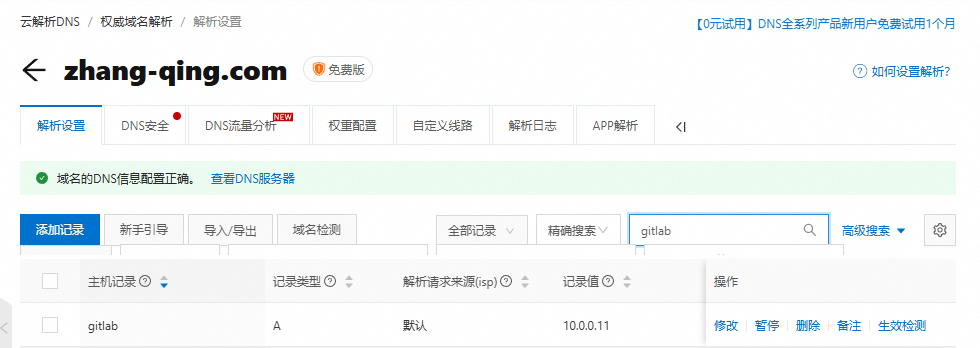
2、添加域名解析
如果是阿里云申请的域名,需要添加A记录
[root@master01 4]# kubectl get ingress -n devops
NAME              CLASS   HOSTS                    ADDRESS     PORTS   AGE
gitlab-ing        nginx   gitlab.zhang-qing.com    10.0.0.11   80      27m
如果不是申请的域名,需要在windows主机上的C:\Windows\System32\drivers\etc文件添加hosts文件解析
#10.0.0.11是gitlab所在节点的IP地址
10.0.0.11 gitlab.zhang-qing.com
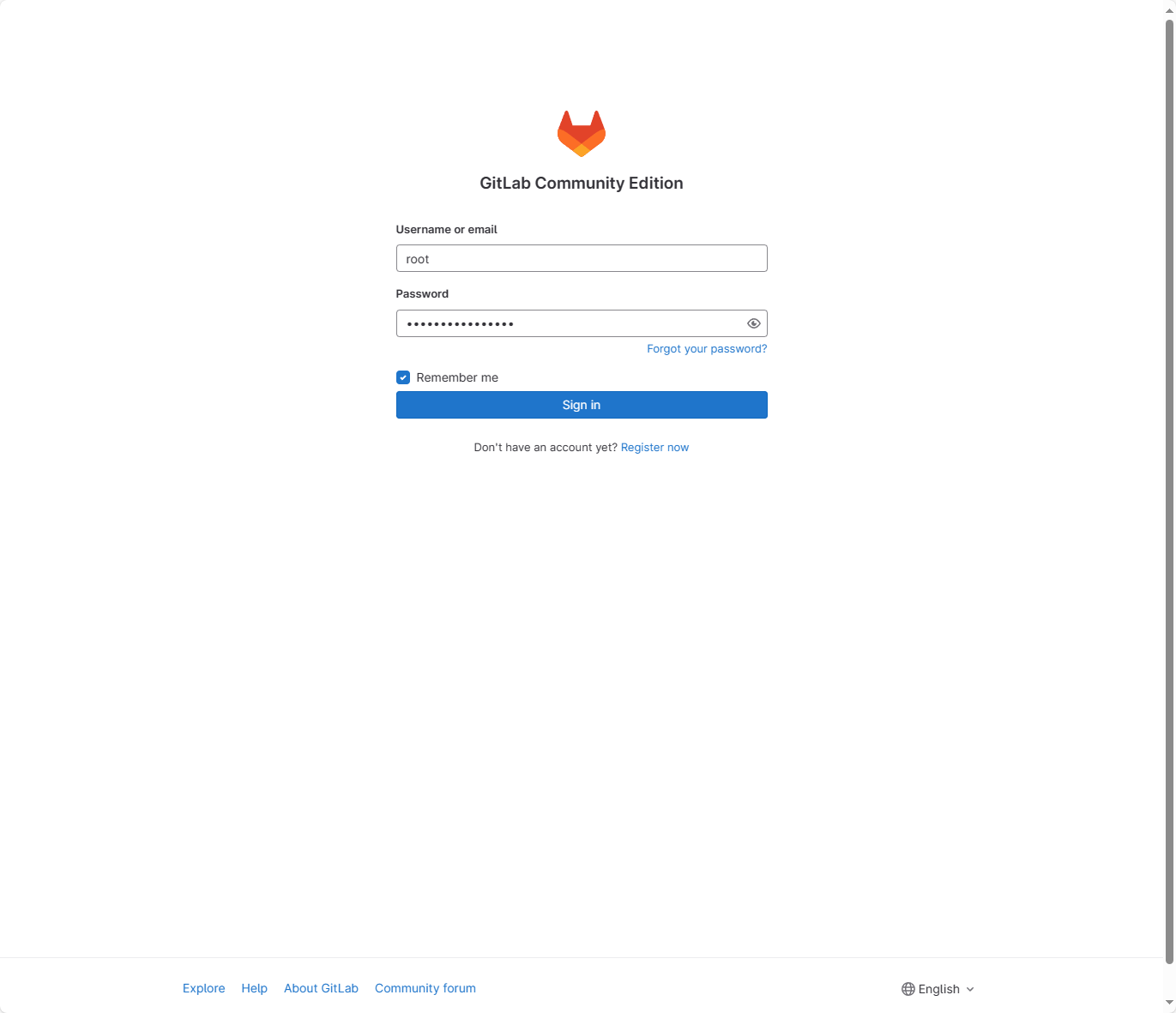
在浏览器上输入http://gitlab.zhang-qing.com/,默认的管理员用户root,密码S6n5Y7b81wRrJnKv
1.5.4 故障处理
1、gitlab的pod处于running,但是0/1
问题处理:
(1)添加名为 "postgres" 的角色
# 查询是否存在 "postgres" 的角色
SELECT * FROM pg_roles WHERE rolname = 'postgres';
# 创建该角色
CREATE ROLE postgres;
(2)确认 "postgres" 角色的登录权限
# 检查 "postgres" 角色的登录权限
SELECT rolname, rolsuper, rolcanlogin FROM pg_roles WHERE rolname = 'postgres';
# 修改 "postgres" 角色的登录权限
ALTER ROLE postgres LOGIN;
1.5.5 设置中文界面
1、在浏览器上输入http://gitlab.zhang-qing.com/,默认的管理员用户root,密码S6n5Y7b81wRrJnKv
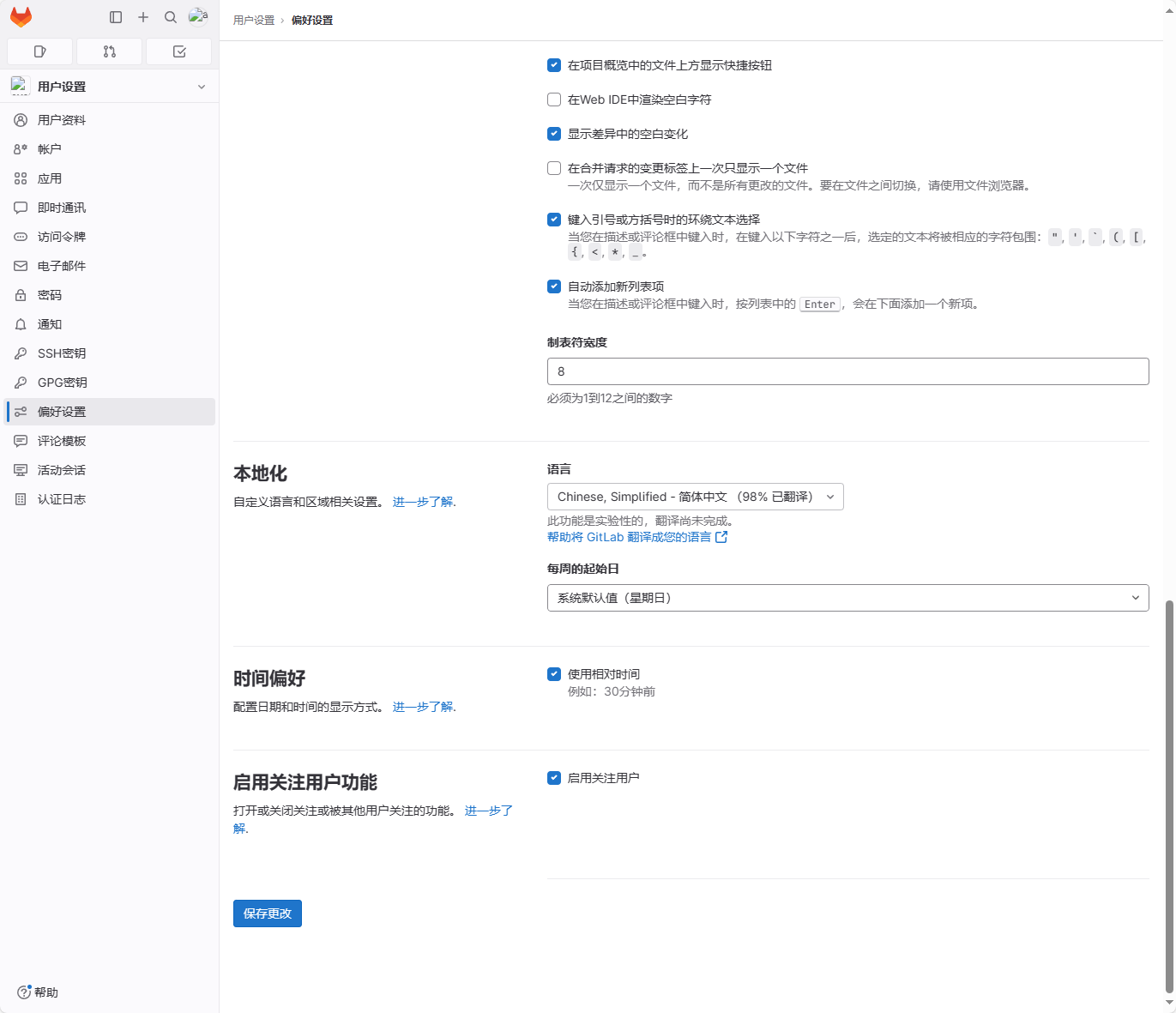
2、点击【Preferences】-【简体中文】-【Save】
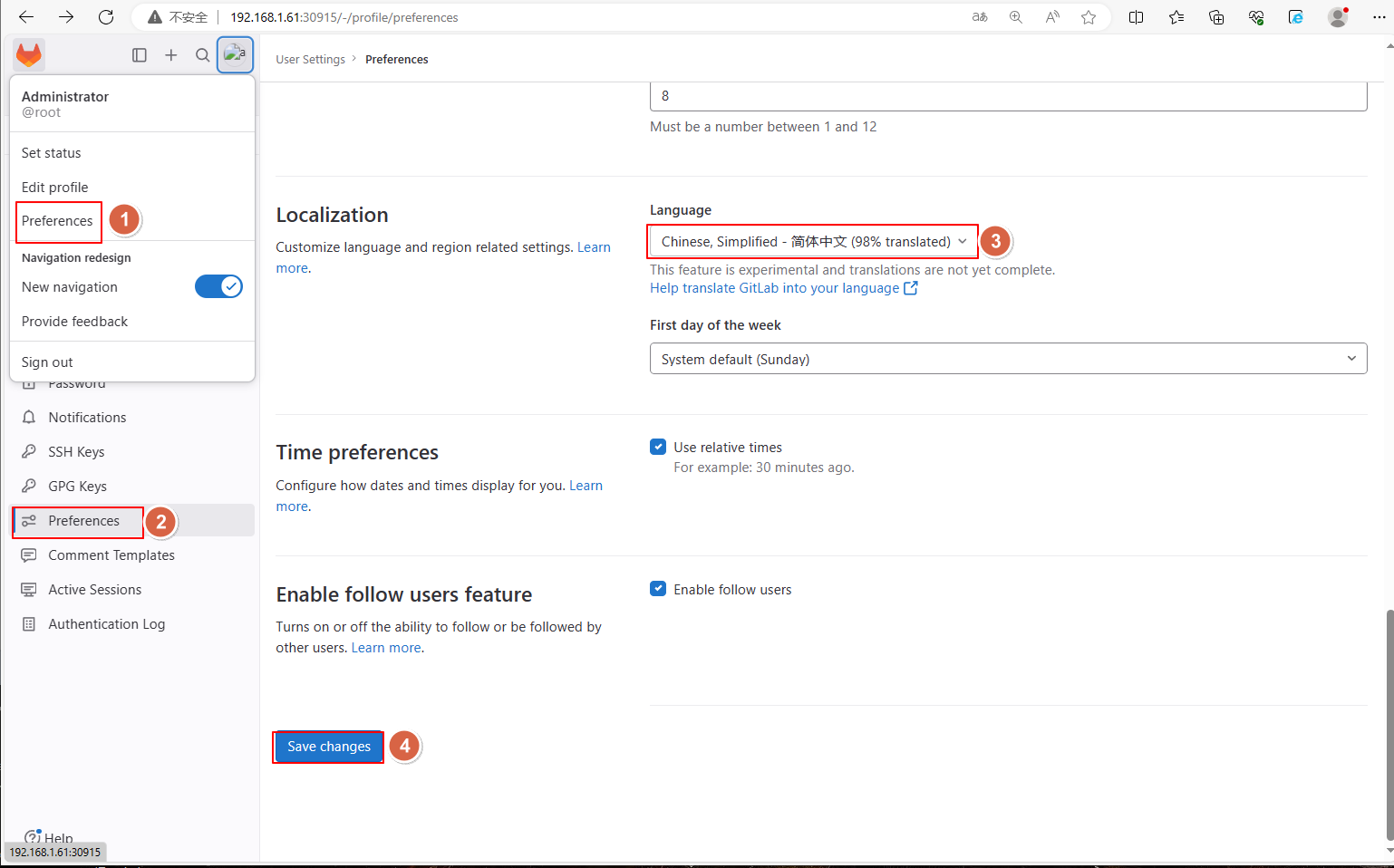
3、重新刷新界面即可切换成中文