
一、使用Skywalking Agent
Java 中使用 agent ,提供了以下三种方式供你选择
- 使用官方提供的基础镜像 skywalking-base;
- 将agent包构建到已经存在的基础镜像中;
- sidecar 模式挂载 agent(推荐);
1.1 使用官方提供的基础镜像
1.2 将agent 包构建到已经存在的基础镜像中
提供这种方式的原因是:官方的镜像属于精简镜像,并且是 openjdk ,可能很多命令没有,需要自己二次安装,这里略过。
1.3 sidecar 模式挂载 agent
- 不需要修改原来的基础镜像,也无需重新构建服务镜像。以sidecar 模式,通过共享 volume 的方式将 agent 所需的相关文件挂载到已经存在的服务镜像中。
- 在 Sidecar 模式下,SkyWalking 代理程序与应用程序是分离的,不会影响应用程序的执行,也不会干扰到应用的性能问题。
1.4 构建 skywalking agent image
通过以下 dockerfile 进行构建:
# 在线下载安装包
FROM registry.cn-hangzhou.aliyuncs.com/github_images1024/alpine:3.8

LABEL maintainer="ZQ"

ENV SKYWALKING_VERSION=8.5.0

ADD https://archive.apache.org/dist/skywalking/${SKYWALKING_VERSION}/apache-skywalking-apm-${SKYWALKING_VERSION}.tar.gz /

RUN tar -zxvf /apache-skywalking-apm-${SKYWALKING_VERSION}.tar.gz && \
    mv apache-skywalking-apm-bin skywalking && \
    mv /skywalking/agent/optional-plugins/apm-trace-ignore-plugin* /skywalking/agent/plugins/ && \
    sed -i 's@# logging.max_history_files=${SW_LOGGING_MAX_HISTORY_FILES:-1}@logging.max_history_files=${SW_LOGGING_MAX_HISTORY_FILES:2}@' /skywalking/agent/config/agent.config && \
    echo -e "\n# Ignore Path" >> /skywalking/agent/config/agent.config && \
    echo "# see https://github.com/apache/skywalking/blob/v8.5.0/docs/en/setup/service-agent/java-agent/agent-optional-plugins/trace-ignore-plugin.md" >> /skywalking/agent/config/agent.config && \
    echo 'trace.ignore_path=${SW_IGNORE_PATH:/health}' >> /skywalking/agent/config/agent.config

# 离线安装包(必须保证包和Dockerfile处于同一目录下)
[root@master01 8]# cat Dockerfile
FROM registry.cn-hangzhou.aliyuncs.com/github_images1024/alpine:3.8

LABEL maintainer="ZQ"

ENV SKYWALKING_VERSION=8.5.0

# 使用本地已存在的 tar.gz 文件(确保构建上下文包含此文件)
COPY apache-skywalking-apm-${SKYWALKING_VERSION}.tar.gz /

RUN tar -zxvf /apache-skywalking-apm-${SKYWALKING_VERSION}.tar.gz && \
    mv apache-skywalking-apm-bin skywalking && \
    mv /skywalking/agent/optional-plugins/apm-trace-ignore-plugin* /skywalking/agent/plugins/ && \
    sed -i 's@# logging.max_history_files=${SW_LOGGING_MAX_HISTORY_FILES:-1}@logging.max_history_files=${SW_LOGGING_MAX_HISTORY_FILES:2}@' /skywalking/agent/config/agent.config && \
    echo -e "\n# Ignore Path" >> /skywalking/agent/config/agent.config && \
    echo "# see https://github.com/apache/skywalking/blob/v8.5.0/docs/en/setup/service-agent/java-agent/agent-optional-plugins/trace-ignore-plugin.md" >> /skywalking/agent/config/agent.config && \
    echo 'trace.ignore_path=${SW_IGNORE_PATH:/health}' >> /skywalking/agent/config/agent.config
待 docker build 完毕后,push 到仓库即可。
$ docker build -t registry.cn-hangzhou.aliyuncs.com/github_images1024/skywalking-agent:8.5.0 .

$ docker push registry.cn-hangzhou.aliyuncs.com/github_images1024/skywalking-agent:8.5.0
1.5 使用 sidecar 挂载
测试demo应用
apiVersion: apps/v1
kind: Deployment
metadata:
  name: demo-skywalking
spec:
  replicas: 1
  selector:
    matchLabels:
      app: demo-skywalking
  strategy:
    rollingUpdate:
      maxSurge: 1
      maxUnavailable: 0
    type: RollingUpdate
  template:
    metadata:
      labels:
        app: demo-skywalking
    spec:
      initContainers:
        - name: init-skywalking-agent
          image: registry.cn-hangzhou.aliyuncs.com/github_images1024/skywalking-agent:8.5.0
          command:
            - 'sh'
            - '-c'
            - 'set -ex;mkdir -p /vmskywalking/agent;cp -r /skywalking/agent/* /vmskywalking/agent;'
          volumeMounts:
            - mountPath: /vmskywalking/agent
              name: skywalking-agent
      containers:
        - image: registry.cn-hangzhou.aliyuncs.com/abroad_images/nginx::1.15.12
          imagePullPolicy: Always
          name: nginx
          ports:
            - containerPort: 80
              protocol: TCP
          volumeMounts:
            - mountPath: /opt/skywalking/agent
              name: skywalking-agent
      volumes:
        - name: skywalking-agent
          emptyDir: {}
以上是挂载 sidecar 的 deployment.yaml 文件,以 nginx 作为服务为例,主要是通过共享 volume 的方式挂载 agent。
首先 initContainers 通过 skywalking-agent 卷挂载了 sw-agent-sidecar 中的/vmskywalking/agent ,并且将上面构建好的镜像中的 agent 目录 cp 到了/vmskywalking/agent 目录,完成之后 nginx 启动时也挂载了 skywalking-agent卷,并将其挂载到了容器的 /opt/skywalking/agent 目录。
二、改造 Spring Cloud 应用
2.1 docker打包并推送到仓库
修改下dockerfile 配置,集成 skywalking agent:
[root@master01 ~]# mkdir -p /root/8/appwithskywalking
[root@master01 ~]# cd /root/8/appwithskywalking/
[root@master01 appwithskywalking]#
# FROM openjdk:8-jdk
FROM registry.cn-hangzhou.aliyuncs.com/abroad_images/openjdk:8-jdk
COPY ./springdemo2023.jar /opt/
RUN mkdir -p data/logs/ \
&& mkdir -p data/skywalking/agent
RUN ln -sf /usr/share/zoneinfo/Asia/Shanghai /etc/localtime
RUN echo 'Asia/Shanghai' > /etc/timezone

ENTRYPOINT [ "java","-Dapp.id=springdemo2023","-javaagent:/data/skywalking/agent/skywalking-agent.jar","-Dskywalking.agent.service_name=springdemo2023","-Dskywalking.collector.backend_service=skywalking-oap.devops.svc.cluster.local:11800", "-jar", "/opt/springdemo2023.jar" ,"-Dfile.encoding=UTF-8"]
注意:
k8s 创建 Service 时,它会创建相应的 DNS 条目。此条目的格式为 <servicename>.<namespace-name>.svc.cluster.local ,这意味着如果容器只使用<service-name> ,它将解析为本地服务到命名空间。 如果要跨命名空间访问,则需要使用完全限定的域名。
编译推送到私仓测试:
$ docker build -t registry.cn-hangzhou.aliyuncs.com/github_images1024/springdemo-skywalking:v1 .
2.2 编写k8s的yaml部署
[root@master01 ~]# mkdir -p /root/8/appwithskywalking
[root@master01 ~]# cd /root/8/appwithskywalking/
[root@master01 appwithskywalking]# vim springdemo2023.yaml
apiVersion: v1
kind: Service
metadata:
  annotations:
    prometheus.io/http-probe: "true"
    prometheus.io/http-probe-port: "8080"
    prometheus.io/http-probe-path: "/apptwo"
  name: springdemo2023
  namespace: default
spec:
  ports:
    - name: web
      port: 8080
      protocol: TCP
      targetPort: 8080
  selector:
    app: springdemo2023
  sessionAffinity: None
  type: ClusterIP

---

apiVersion: apps/v1
kind: Deployment
metadata:
  name: springdemo2023
  namespace: default
spec:
  replicas: 1
  revisionHistoryLimit: 10
  selector:
    matchLabels:
      app: springdemo2023
  strategy:
    rollingUpdate:
      maxSurge: 25%
      maxUnavailable: 25%
    type: RollingUpdate
  template:
    metadata:
      labels:
        app: springdemo2023
    spec:
      imagePullSecrets:
        - name: harborsecret
      initContainers:
        - name: init-skywalking-agent
          image: registry.cn-hangzhou.aliyuncs.com/github_images1024/skywalking-agent:8.5.0
          command:
            - sh
            - -c
            - set -ex;mkdir -p /vmskywalking/agent;cp -r /skywalking/agent/* /vmskywalking/agent;
          volumeMounts:
            - mountPath: /vmskywalking/agent
              name: skywalking-agent
      containers:
        - image: registry.cn-hangzhou.aliyuncs.com/github_images1024/springdemo-skywalking:v1
          imagePullPolicy: IfNotPresent
          livenessProbe:
            failureThreshold: 5
            httpGet:
              path: /apptwo
              port: 8080
              scheme: HTTP
            initialDelaySeconds: 30
            periodSeconds: 10
            successThreshold: 1
            timeoutSeconds: 2
          name: springdemo2023
          ports:
            - containerPort: 8080
              name: web
              protocol: TCP
          readinessProbe:
            failureThreshold: 5
            httpGet:
              path: /apptwo
              port: 8080
              scheme: HTTP
            initialDelaySeconds: 20
            periodSeconds: 5
            successThreshold: 1
            timeoutSeconds: 2
          volumeMounts:
            - mountPath: /data/skywalking/agent
              name: skywalking-agent
      dnsPolicy: ClusterFirst
      restartPolicy: Always
      terminationGracePeriodSeconds: 60
      volumes:
        - name: skywalking-agent
          emptyDir: {}

# 应用
[root@master01 appwithskywalking]# kaf springdemo2023.yaml

# 验证
[root@master01 appwithskywalking]# kgp | grep springdemo2023
springdemo2023-c58b95c66-g7ngh   1/1     Running   0              108s
模拟访问
# 多执行几次
[root@master01 appwithskywalking]# curl java.zhang-qing.com/apptwo -i
打开浏览器输入http://skywalking.zhang-qing.com/查看skywalking(账号密码都为admin)
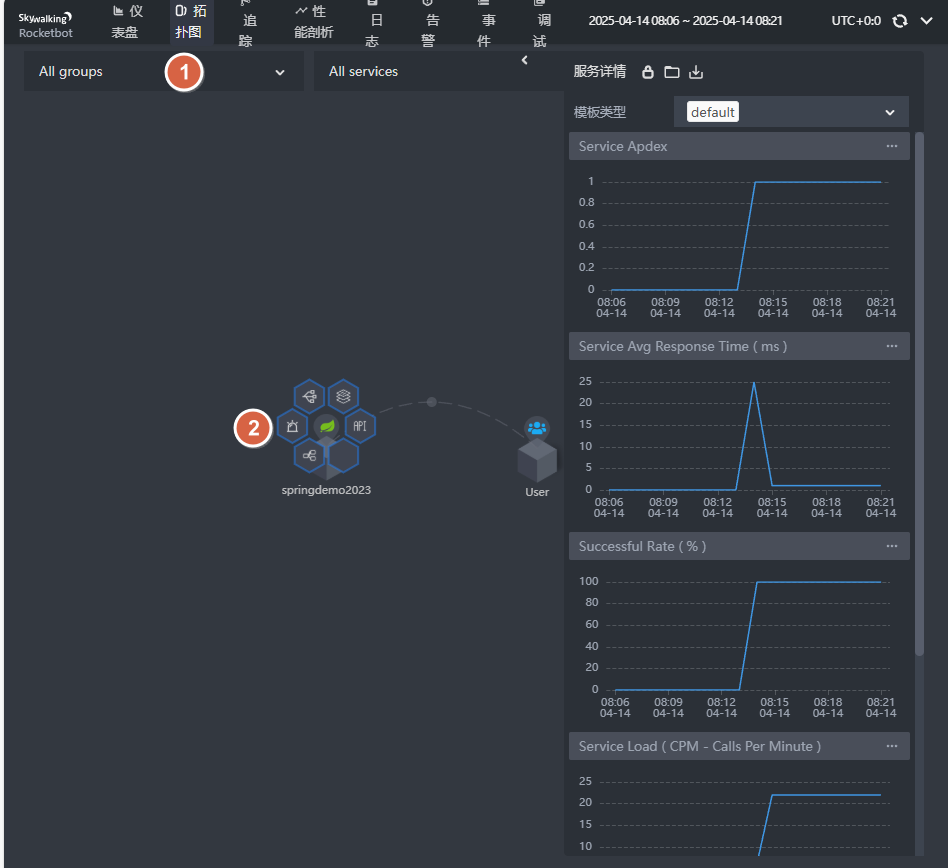
查看拓扑图
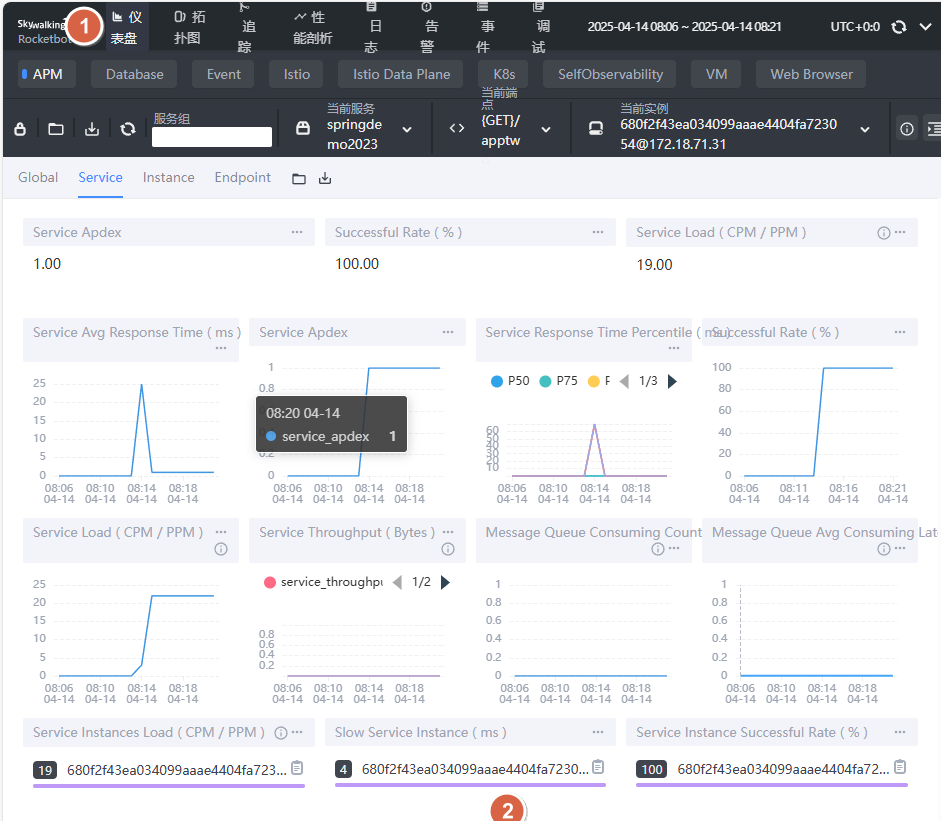
查看仪表盘