

一、目的
充分利用 MinIO 的高性能、高扩展性以及对 Amazon S3 API 的兼容优势,以满足 Kubernetes 环境下不同工作负载对于持久化存储的需求。
二、当前的缺陷
miniO官方支持:
Persistent Volumes
For Kubernetes clusters where nodes have Direct Attached Storage, MinIO strongly recommends using the DirectPV CSI driver. DirectPV provides a distributed persistent volume manager that can discover, format, mount, schedule, and monitor drives across Kubernetes nodes. DirectPV addresses the limitations of manually provisioning and monitoring local persistent volumes.
当前遇到的问题:
1)动态卷管理局限(官方不支持):MinIO 直接集成至 Kubernetes 时并不支持 Container Storage Interface (CSI),导致无法轻易实现实时、灵活的存储分配。
2)传统 NFS 解决方案的问题:NFS 在面对动态扩展、大规模并发读写、复杂安全策略及接口匹配等方面存在局限:
- 动态扩展能力不强;
- 性能瓶颈,尤其是在 I/O 密集型应用中;
- 安全隔离机制不够完善;
- 与 MinIO 对象存储系统的接口不兼容。
三、解决方案
JuiceFS 是一款先进的 POSIX 兼容且支持 S3 接口的分布式文件系统,它具备以下核心特点以克服现有缺陷:
- 无缝集成:JuiceFS 可直接与 MinIO 对接,解决了接口不兼容问题。
- 动态 CSI 支持:通过集成 JuiceFS CSI 插件,Kubernetes 能够轻松地进行动态持久卷的管理和调 度。
- 性能优化与数据持久化:支持将 MinIO 作为底层持久化后端,从而实现了数据的一致性、可用性和高效的读写操作。
四、JuiceFS 架构
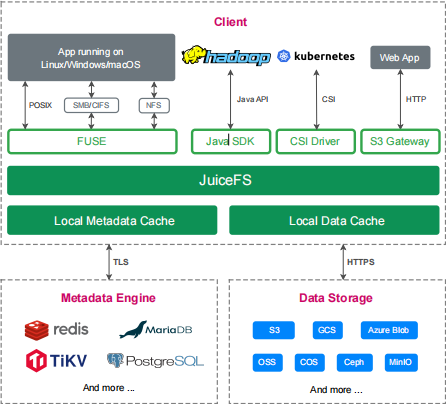
4.1 主要核心功能
从上图,我们可以看到 JuiceFS 分为了三层,从上往下依次为:
| 分类 | 描述 |
|---|---|
| Client(JuiceFS 客 户端) | 客户端,用来创建、挂载 FS 等 |
| Metada Engine (元数据引擎) | 存储数据对应的元数据( metadata )包含文件名、文件大小、权限组、 创建修改时间和目录结构,支持 Redis 、 MySQL 、 TiKV 等多种引擎; |
| Data Storage(数据存储) | Ceph 等存储数据本身,支持本地磁盘、公有云或私有云对象存储、自建介质; |
这里主要讲下 JuiceFS 在 Client客户端层面 的 文件系统接口 的技术实现:
- 通过 Kubernetes CSI Driver,JuiceFS 文件系统能够直接为 Kubernetes 提供海量存储;
- 通过 S3 Gateway,使用 S3 作为存储层的应用可直接接入,同时可使用 AWS CLI、MinIO client 等工具访问 JuiceFS 文件系统;
五、基于 JuiceFS 的 MiniO 存储实战
5.1 客户端安装
使用命令安装,会根据硬件架构自动下载安装最新版 JuiceFS 客户端:
[root@master01 15]# curl -sSL https://d.juicefs.com/install | sh -
Downloading juicefs-1.2.3-linux-amd64.tar.gz
100%[======================================>] 28,020,862  25.7MB/s   in 1.0s

2025-04-20 09:07:37 (25.7 MB/s) - ‘/tmp/juicefs-install.SsbDyF/juicefs-1.2.3-linux-amd64.tar.gz’ saved [28020862/28020862]

Downloading juicefs-1.2.3-linux-amd64.tar.gz
100%[======================================>] 499         --.-K/s   in 0s

2025-04-20 09:07:37 (180 MB/s) - ‘/tmp/juicefs-install.SsbDyF/checksums.txt’ saved [499/499]

which: no shasum in (/usr/local/sbin:/usr/local/bin:/usr/sbin:/usr/bin:/root/10/istio-1.20.8/bin:/root/bin)
Install juicefs to /usr/local/bin/juicefs successfully!
下载完成后,使用命令:
[root@master01 15]# juicefs version
juicefs version 1.2.3+2025-01-22.4f2aba8
5.2 创建文件系统
- 创建 bucket: k8sapp
- ACCESS_KEY,SECRET_KEY 链接信息
[root@master01 15]# mc mb k8s-s3/k8sapp
Bucket created successfully `k8s-s3/k8sapp`.

ACCESS_KEY="<your-access-key>"
SECRET_KEY="<your-secret-key>"
- 创建Redis数据库
docker run -d \
  --name redis-server \
  -p 6379:6379 \
  -e REDIS_PASSWORD="<redis-password>" \
  --restart always \
  registry.cn-hangzhou.aliyuncs.com/abroad_images/redis:7.2.5 \
  redis-server --requirepass "$REDIS_PASSWORD"
- 创建名为 jfs-k8sapp 的文件系统,使用 Redis 的 1 号数据库存储元数据:
juicefs format \
    --storage minio \
    --bucket http://endpoint地址:端口/rtc \
    --access-key minio的access-key \
    --secret-key minio的secret-key \
    "redis://:redis密码@redis地址:redis端口/数据库编号" \
    jfs-k8sapp
- 实战操作:
# 操作命令
juicefs format \
    --storage minio \
    --bucket "http://<minio-endpoint>/k8sapp" \
    --access-key "<your-access-key>" \
    --secret-key "<your-secret-key>" \
    redis://:<redis-password>@<node-ip>:6379/2 \
    jfs-k8sapp

# 具体运行
[root@master01 15]# juicefs format \
> --storage minio \
> --bucket "http://<minio-endpoint>/k8sapp" \
> --access-key "<your-access-key>" \
>     --secret-key "<your-secret-key>" \
> redis://:<redis-password>@<node-ip>:6379/2 \
> jfs-k8sapp
2025/04/20 09:22:35.993498 juicefs[57189] <INFO>: Meta address: redis://:****@<node-ip>:6379/2 [interface.go:504]
2025/04/20 09:22:35.996171 juicefs[57189] <WARNING>: AOF is not enabled, you may lose data if Redis is not shutdown properly. [info.go:84]
2025/04/20 09:22:35.996517 juicefs[57189] <INFO>: Ping redis latency: 244.745µs [redis.go:3512]
2025/04/20 09:22:35.997005 juicefs[57189] <INFO>: Data use minio://s3.zhang-qing.com/k8sapp/jfs-k8sapp/ [format.go:484]
2025/04/20 09:22:36.080874 juicefs[57189] <INFO>: Volume is formatted as {
  "Name": "jfs-k8sapp",
  "UUID": "db93953e-0895-4c8f-935b-4c950b95af67",
  "Storage": "minio",
  "Bucket": "http://<minio-endpoint>/k8sapp",
  "AccessKey": "<your-access-key>",
  "SecretKey": "removed",
  "BlockSize": 4096,
  "Compression": "none",
  "EncryptAlgo": "aes256gcm-rsa",
  "KeyEncrypted": true,
  "TrashDays": 1,
  "MetaVersion": 1,
  "MinClientVersion": "1.1.0-A",
  "DirStats": true,
  "EnableACL": false
} [format.go:521]
- 挂载 JuiceFS 卷:
# 操作命令
juicefs mount -d redis://:<redis-password>@<node-ip>:6379/2 /mnt/jfs-k8sapp -d

# 具体运行
[root@master01 15]# juicefs mount -d redis://:<redis-password>@<node-ip>:6379/2 /mnt/jfs-k8sapp -d
2025/04/20 09:25:55.540099 juicefs[59262] <INFO>: Meta address: redis://:****@<node-ip>:6379/2 [interface.go:504]
2025/04/20 09:25:55.543751 juicefs[59262] <WARNING>: AOF is not enabled, you may lose data if Redis is not shutdown properly. [info.go:84]
2025/04/20 09:25:55.544540 juicefs[59262] <INFO>: Ping redis latency: 688.336µs [redis.go:3512]
2025/04/20 09:25:55.546372 juicefs[59262] <INFO>: Data use minio://s3.zhang-qing.com/k8sapp/jfs-k8sapp/ [mount.go:629]
2025/04/20 09:25:56.048859 juicefs[59262] <INFO>: OK, jfs-k8sapp is ready at /mnt/jfs-k8sapp [mount_unix.go:200]
- 挂载情况
[root@master01 15]# df -Th | grep /mnt/jfs-k8sapp
JuiceFS:jfs-k8sapp                                                                                          fuse.juicefs  1.0P     0  1.0P   0% /mnt/jfs-k8sapp
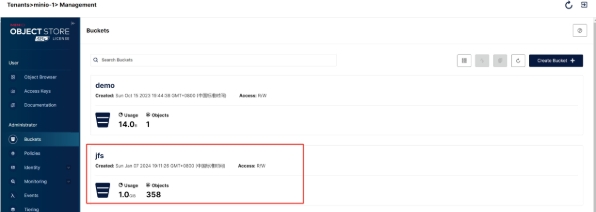
- webUI查看存储
依次点击【minio-1】-【Management Console】-【k8sapp】-【k8sapp】即可查看创建的存储
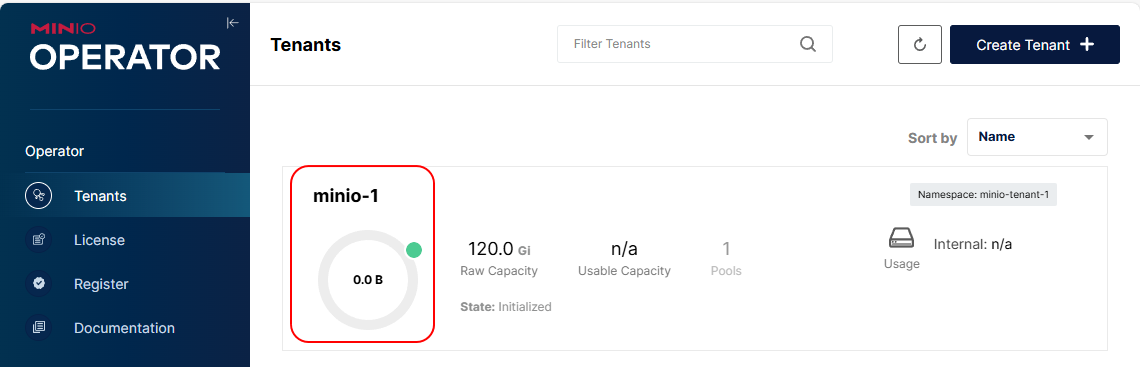
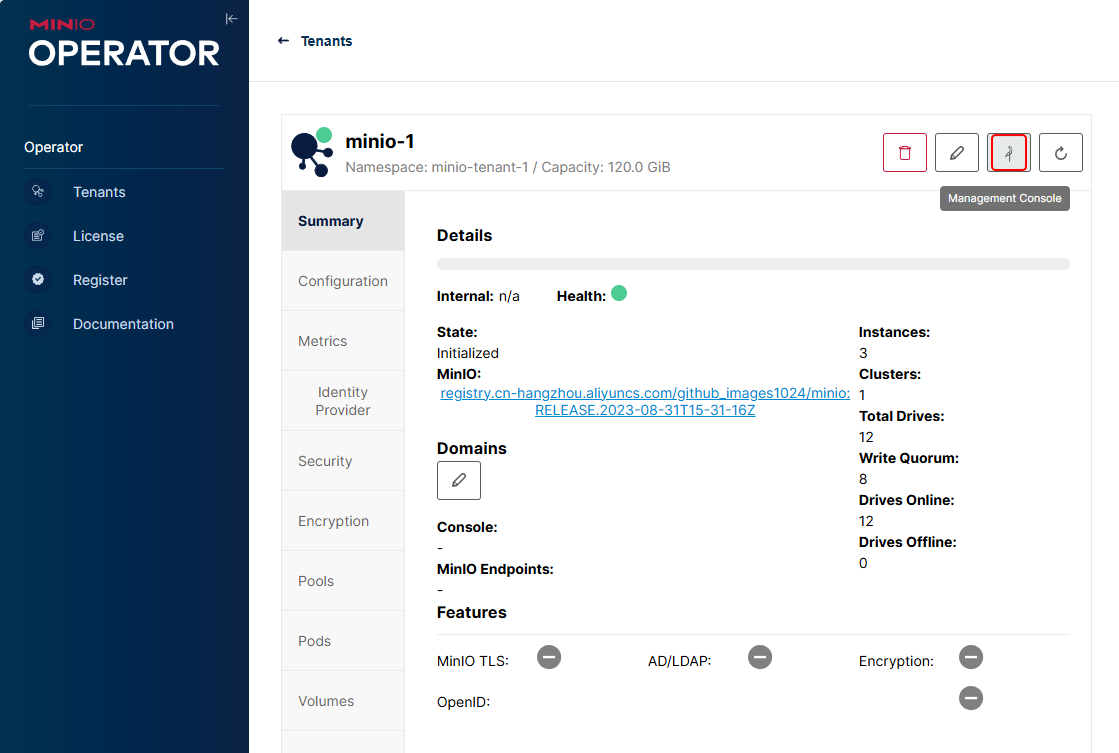
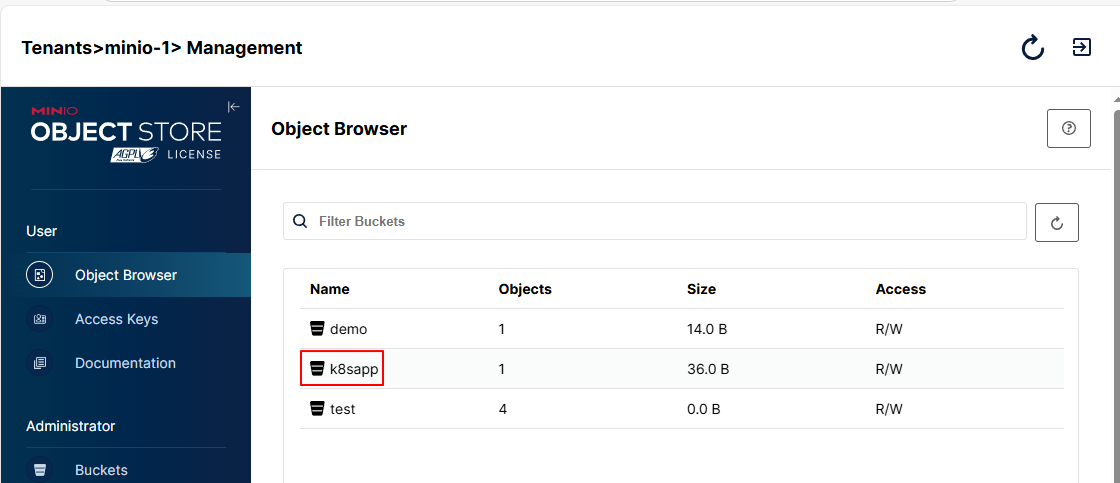
依次点击【minio-1】-【Management Console】-【Buckets】,查看到名为k8sapp的Bucket
5.3 性能验证
[root@master01 15]# juicefs bench /mnt/jfs-k8sapp
- 卸载
[root@master01 15]# juicefs umount /mnt/jfs-k8sapp
- fstab 自动挂载
[root@master01 15]# cp /usr/local/bin/juicefs /sbin/mount.juicefs

[root@master01 15]# cat /etc/fstab
...
redis://:<redis-password>@<node-ip>:6379/1 /mnt/jfs-k8sapp juicefs
_netdev,cache-size=10240 0 0
说明: cache-size=10240 10GB,越大性能越好。
六、基于Kubernetes 的 JuiceFS 实战
6.1 先来说下痛点
- 传统的文件系统与 Kubernetes 适配性较差,当在容器平台上对接这些文件系统时,企业需要投入 额外成本;
- 当迁移需要数据共享的应用至 Kubernetes 时, 容器平台需要一个支持多 Pod 同时读写 (ReadWriteMany)的存储系统;
- 大量应用容器启动时并发加载数据,存储系统需要满足高并发请求下应用对于稳定性与性能的双重要求。
6.2 基于JuiceFS的优势
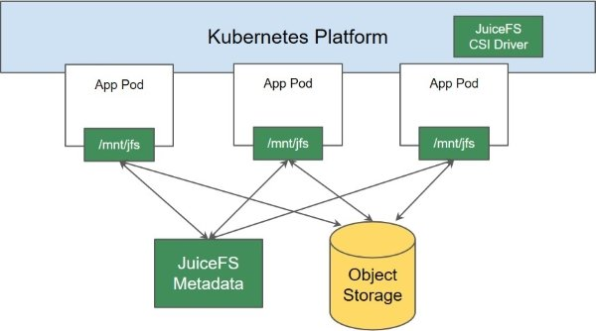
- JuiceFS 提供 Kubernetes CSI Driver 支持,通过 Kubernetes 原生的存储方案 (PersistentVolumeClaim)来访问数据,对 Kubernetes 生态友好;
- JuiceFS 支持 Pod 同时读写(ReadWriteMany),满足不同类型应用的访问需求;
- JuiceFS 支持上千客户端同时挂载及并发读写,支撑 Kubernetes 容器平台大规模应用的使用场景;
- JuiceFS CSI Driver支持挂载点故障自动恢复,保障应用容器访问数据的可用性;
6.3 基于 Kubernetes 的实现架构图
6.4 使用 Helm 安装 JuiceFS CSI Driver
Helm 是一个针对 Kubernetes 的包管理器,在安装、升级和维护等方面都更直观,所以 Helm 是更推荐的方式!
# 添加JuiceFS仓库
[root@master01 15]# helm repo add juicefs https://juicedata.github.io/charts/

# 更新仓库
[root@master01 15]# helm repo update

# 安装 CSI Driver
## 外网环境安装
[root@master01 15]# helm install juicefs-csi-driver juicefs/juicefs-csi-driver -n kube-system

## 内网环境安装
[root@master01 15]# wget https://github.com/juicedata/charts/releases/download/helm-chart-juicefs-csi-driver-0.23.1/juicefs-csi-driver-0.23.1.tgz
[root@master01 15]# tar xf juicefs-csi-driver-0.23.1.tgz
[root@master01 15]# cd juicefs-csi-driver/
### 替换镜像为国内镜像
[root@master01 juicefs-csi-driver]# vim values.yaml
### 修改第11行内容
 11   repository: registry.cn-hangzhou.aliyuncs.com/github_images1024/juicefs-csi-driver
### 修改第16行内容
 16   repository: registry.cn-hangzhou.aliyuncs.com/github_images1024/csi-dashboard
### 修改第22行内容
 22     repository: registry.cn-hangzhou.aliyuncs.com/github_images1024/livenessprobe
### 修改第26行内容
 26     repository: registry.cn-hangzhou.aliyuncs.com/github_images1024/csi-node-driver-registrar
### 修改第30行内容
 30     repository: registry.cn-hangzhou.aliyuncs.com/github_images1024/csi-provisioner
### 修改第34行内容
 34     repository: registry.cn-hangzhou.aliyuncs.com/github_images1024/csi-resizer
### 修改第333行内容
333   ce: "registry.cn-hangzhou.aliyuncs.com/github_images1024/mount:ce-v1.2.3"

### values.yaml完整配置文件
[root@master01 juicefs-csi-driver]# egrep -v "#|^$" values.yaml
image:
  repository: registry.cn-hangzhou.aliyuncs.com/github_images1024/juicefs-csi-driver
  tag: "v0.27.0"
  pullPolicy: ""
dashboardImage:
  repository: registry.cn-hangzhou.aliyuncs.com/github_images1024/csi-dashboard
  tag: "v0.27.0"
  pullPolicy: ""
sidecars:
  livenessProbeImage:
    repository: registry.cn-hangzhou.aliyuncs.com/github_images1024/livenessprobe
    tag: "v2.12.0"
    pullPolicy: ""
  nodeDriverRegistrarImage:
    repository: registry.cn-hangzhou.aliyuncs.com/github_images1024/csi-node-driver-registrar
    tag: "v2.9.0"
    pullPolicy: ""
  csiProvisionerImage:
    repository: registry.cn-hangzhou.aliyuncs.com/github_images1024/csi-provisioner
    tag: "v2.2.2"
    pullPolicy: ""
  csiResizerImage:
    repository: registry.cn-hangzhou.aliyuncs.com/github_images1024/csi-resizer
    tag: "v1.9.0"
    pullPolicy: ""
imagePullSecrets: []
mountMode: mountpod
globalConfig:
  enabled: true
  manageByHelm: true
  enableNodeSelector: false

  mountPodPatch:

hostAliases: []
kubeletDir: /var/lib/kubelet
jfsMountDir: /var/lib/juicefs/volume
jfsConfigDir: /var/lib/juicefs/config
immutable: false
dnsPolicy: ClusterFirstWithHostNet
dnsConfig: {}
serviceAccount:
  controller:
    create: true
    annotations: {}
    name: "juicefs-csi-controller-sa"
  node:
    create: true
    annotations: {}
    name: "juicefs-csi-node-sa"
  dashboard:
    create: true
    annotations: {}
    name: "juicefs-csi-dashboard-sa"
controller:
  enabled: true
  debug: false
  leaderElection:
    enabled: true
    leaderElectionNamespace: ""
    leaseDuration: ""
  provisioner: true
  cacheClientConf: true
  replicas: 2
  resources:
    limits:
      cpu: 1000m
      memory: 1Gi
    requests:
      cpu: 100m
      memory: 512Mi
  terminationGracePeriodSeconds: 30
  labels: {}
  annotations: {}
  metricsPort: "9567"
  affinity: {}
  nodeSelector: {}
  tolerations:
  - key: CriticalAddonsOnly
    operator: Exists
  service:
    port: 9909
    type: ClusterIP
  priorityClassName: system-cluster-critical
  envs:
node:
  enabled: true
  debug: false
  hostNetwork: false
  resources:
    limits:
      cpu: 1000m
      memory: 1Gi
    requests:
      cpu: 100m
      memory: 512Mi
  storageClassShareMount: false
  mountPodNonPreempting: false
  terminationGracePeriodSeconds: 30
  labels: {}
  annotations: {}
  metricsPort: "9567"
  affinity: {}
  nodeSelector: {}
  tolerations:
  - key: CriticalAddonsOnly
    operator: Exists
  priorityClassName: system-node-critical
  envs: []
  updateStrategy:
    rollingUpdate:
      maxUnavailable: 50%
  ifPollingKubelet: true
  livenessProbe:
    failureThreshold: 5
    httpGet:
      path: /healthz
    initialDelaySeconds: 10
    periodSeconds: 10
    timeoutSeconds: 3
metrics:
  enabled: false
  port: 8080
  service:
    annotations: {}
    servicePort: 8080
dashboard:
  enabled: true
  enableManager: true
  auth:
    enabled: false
    existingSecret: ""
    username: admin
    password: admin
  replicas: 1
  leaderElection:
    enabled: false
    leaderElectionNamespace: ""
    leaseDuration: ""
  hostNetwork: false
  resources:
    limits:
      cpu: 1000m
      memory: 1Gi
    requests:
      cpu: 100m
      memory: 200Mi
  labels: {}
  annotations: {}
  affinity: {}
  nodeSelector: {}
  tolerations:
  - key: CriticalAddonsOnly
    operator: Exists
  service:
    port: 8088
    type: ClusterIP
  ingress:
    enabled: false
    className: "nginx"
    annotations: {}
    hosts:
    - host: ""
      paths:
      - path: /
        pathType: ImplementationSpecific
    tls: []
  priorityClassName: system-node-critical
  envs: []
defaultMountImage:
  ce: "registry.cn-hangzhou.aliyuncs.com/github_images1024/mount:ce-v1.2.3"
  ee: ""
webhook:
  certManager:
    enabled: true
  caBundlePEM: |
  crtPEM: |
  keyPEM: |
  timeoutSeconds: 5
  FailurePolicy: Fail
validatingWebhook:
  enabled: false
  timeoutSeconds: 5
  FailurePolicy: Ignore
storageClasses:
- name: "juicefs-sc"
  enabled: false
  existingSecret: ""
  reclaimPolicy: Retain
  allowVolumeExpansion: true
  backend:
    name: ""
    metaurl: ""
    storage: ""
    bucket: ""
    token: ""
    accessKey: ""
    secretKey: ""
    envs: ""
    configs: ""
    trashDays: ""
    formatOptions: ""
  mountOptions:
  pathPattern: ""
  cachePVC: ""
  mountPod:
    resources:
      limits:
        cpu: 5000m
        memory: 5Gi
      requests:
        cpu: 1000m
        memory: 1Gi
    image: ""
    annotations: {}

##离线进行安装
[root@master01 juicefs-csi-driver]#
helm install juicefs-csi-driver /root/15/juicefs-csi-driver \
-n kube-system \
-f values.yaml

##执行后回显信息
NAME: juicefs-csi-driver
LAST DEPLOYED: Sun Apr 20 10:16:59 2025
NAMESPACE: kube-system
STATUS: deployed
REVISION: 1
TEST SUITE: None
NOTES:
Guide on how to configure a StorageClass or PV and start using the driver are here:
https://juicefs.com/docs/csi/guide/pv

Before start, you need to configure file system credentials in Secret:

- If you are using JuiceFS enterprise, you should create a file system in JuiceFS console, refer to this guide: https://juicefs.com/docs/cloud/getting_started/#create-file-system

- If you are using JuiceFS community, you should prepare a metadata engine and object storage:
  1. For metadata server, you can refer to this guide: https://juicefs.com/docs/community/databases_for_metadata
  2. For object storage, you can refer to this guide: https://juicefs.com/docs/community/how_to_setup_object_storage

Then you can use this file to test:

```
apiVersion: v1
kind: Secret
metadata:
  name: juicefs-secret
  namespace: default
type: Opaque
stringData:
  name: juicefs-vol              # The JuiceFS file system name
  access-key: <ACCESS_KEY>       # Object storage credentials
  secret-key: <SECRET_KEY>       # Object storage credentials
  # follows are for JuiceFS enterprise
  token: ${JUICEFS_TOKEN}        # Token used to authenticate against JuiceFS Volume
  # follows are for JuiceFS community
  metaurl: <META_URL>            # Connection URL for metadata engine.
  storage: s3                    # Object storage type, such as s3, gs, oss.
  bucket: <BUCKET>               # Bucket URL of object storage.
---
apiVersion: storage.k8s.io/v1
kind: StorageClass
metadata:
  name: juicefs-sc
provisioner: csi.juicefs.com
parameters:
  csi.storage.k8s.io/provisioner-secret-name: juicefs-secret
  csi.storage.k8s.io/provisioner-secret-namespace: default
  csi.storage.k8s.io/node-publish-secret-name: juicefs-secret
  csi.storage.k8s.io/node-publish-secret-namespace: default
---
apiVersion: v1
kind: PersistentVolumeClaim
metadata:
  name: juicefs-pvc
  namespace: default
spec:
  accessModes:
  - ReadWriteMany
  resources:
    requests:
      storage: 10Pi
  storageClassName: juicefs-sc
---
apiVersion: v1
kind: Pod
metadata:
  name: juicefs-app
  namespace: default
spec:
  containers:
  - args:
    - -c
    - while true; do echo $(date -u) >> /data/out.txt; sleep 5; done
    command:
    - /bin/sh
    image: busybox
    name: app
    volumeMounts:
    - mountPath: /data
      name: juicefs-pv
  volumes:
  - name: juicefs-pv
    persistentVolumeClaim:
      claimName: juicefs-pvc
```

# 后面结束后可执行下面命令进行删除
[root@master01 15]# helm uninstall juicefs-csi-driver -n kube-system
命令执行完毕,还需要等待相应的服务和容器部署妥当,使用 Kubectl 检查 Pods 部署情况:
[root@master01 15]# kubectl get pods -n kube-system -l app.kubernetes.io/name=juicefs-csi-driver
NAME                                     READY   STATUS    RESTARTS   AGE
juicefs-csi-controller-0                 3/3     Running   0          2m14s
juicefs-csi-controller-1                 3/3     Running   0          28s
juicefs-csi-dashboard-7494f89848-htqp7   1/1     Running   0          2m14s
juicefs-csi-node-44v68                   3/3     Running   0          2m14s
juicefs-csi-node-cwghx                   3/3     Running   0          2m14s
juicefs-csi-node-hrvf7                   3/3     Running   0          2m14s
juicefs-csi-node-vbg5s                   3/3     Running   0          2m14s
juicefs-csi-node-wqwqr                   3/3     Running   0          2m14s
配置基础数据:
- 创建 jfs-secret.yaml ,基础配置信息挂载到 Kubernetes 中。
#定义
[root@master01 15]# vim jfs-secret.yaml
apiVersion: v1
kind: Secret
metadata:
  name: juicefs-secret
  namespace: default
type: Opaque
stringData:
  name: juicefs-vol # The JuiceFS file system name
  metaurl: redis://:<redis-password>@<node-ip>:6379/2
  storage: minio
  bucket: http://<minio-endpoint>/k8sapp
  access-key: <your-access-key>
  secret-key: <your-secret-key>
# 设置 Mount Pod 时区,默认为 UTC。
# envs: "{TZ: Asia/Shanghai}"
# 如需在 Mount Pod 中创建文件系统,也可以将更多 juicefs format 参 数填入 format-options。
# format-options: trash-days=1,block-size=4096

#创建
[root@master01 15]# kaf jfs-secret.yaml

#验证
[root@master01 15]# kg -f  jfs-secret.yaml
NAME             TYPE     DATA   AGE
juicefs-secret   Opaque   6      6s
- 创建 jfs-sc.yaml ,配置 Kubernetes 集群 SC。
- 其中,reclaimPolicy 这一项需要根据实际需要来设置:
- Retain:代表当 PVC 被删除时,相应的 PV 会保留下来,不会被删除,对应的文件系统中的数据也不会被删除;
- Delete:代表当 PVC 被删除时,相应的 PV 将一起被删除,同时对应的文件系统中的数据会被一同删除。
# 定义sc
[root@master01 15]# vim jfs-sc.yaml
apiVersion: storage.k8s.io/v1
kind: StorageClass
metadata:
  name: juicefs-sc
provisioner: csi.juicefs.com
reclaimPolicy: Retain
parameters:
  csi.storage.k8s.io/provisioner-secret-name: juicefs-secret
  csi.storage.k8s.io/provisioner-secret-namespace: default
  csi.storage.k8s.io/node-publish-secret-name: juicefs-secret
  csi.storage.k8s.io/node-publish-secret-namespace: default

# 创建
[root@master01 15]# kaf jfs-sc.yaml

# 验证
[root@master01 15]# kg sc | grep juicefs-sc
juicefs-sc              csi.juicefs.com                Retain          Immediate              false                  46s
StorageClass 案例验证:
[root@master01 15]# vim jfs-dp-pvc.yaml
apiVersion: v1
kind: PersistentVolumeClaim
metadata:
  name: my-apache-pvc
spec:
  accessModes:
    - ReadWriteMany
  resources:
    requests:
      storage: 10Gi
  storageClassName: juicefs-sc
---
apiVersion: apps/v1
kind: Deployment
metadata:
  name: my-apache
  namespace: default
spec:
  replicas: 1
  selector:
    matchLabels:
      app: my-apache
  template:
    metadata:
      labels:
        app: my-apache
    spec:
      containers:
        - name: apache
          image: registry.cn-hangzhou.aliyuncs.com/abroad_images/httpd:alpine
          volumeMounts:
            - name: data
              mountPath: /usr/local/apache2/htdocs
      volumes:
        - name: data
          persistentVolumeClaim:
            claimName: my-apache-pvc
---
apiVersion: v1
kind: Service
metadata:
  name: my-apache
  namespace: default
spec:
  selector:
    app: my-apache
  ports:
    - protocol: TCP
      port: 80
      targetPort: 80
  type: LoadBalancer

# 应用
[root@master01 15]# kaf jfs-dp-pvc.yaml

# 验证
## 首先会在kube-system命名空间下生成一个pvc的pod
[root@master01 15]# kgp -nkube-system | grep pvc
juicefs-master03-pvc-4592f430-d691-49b4-83cc-5826df520a21-jyvenr   1/1     Running   0              4m39s

## pvc相关的pod启动成功后,会在default下面生成一个my-apache的pod
[root@master01 15]# kgp  | grep my-apache
my-apache-6955596d7c-jtqsl                 2/2     Running   0                3m12s
资源状态确认:
# 验证sc
[root@master01 15]# kubectl get sc | grep juicefs-sc
juicefs-sc              csi.juicefs.com                Retain          Immediate              false                  5m55s

# 验证secret
[root@master01 15]# kubectl get secret |grep juicefs
juicefs-secret        Opaque                                6      6m26s

# 验证pv,pvc
[root@master01 jfs-k8sapp]# kubectl get pvc,pv |grep my-apache-pvc
persistentvolumeclaim/my-apache-pvc   Bound    pvc-644315d1-508b-4dc9-9d59-7669bd164439   10Gi       RWX            juicefs-sc     106s
persistentvolume/pvc-4592f430-d691-49b4-83cc-5826df520a21   10Gi       RWX            Retain           Released   default/my-apache-pvc                                 juicefs-sc                     3h30m
persistentvolume/pvc-644315d1-508b-4dc9-9d59-7669bd164439   10Gi       RWX            Retain           Bound      default/my-apache-pvc                                 juicefs-sc                     106s

# 验证pod
[root@master01 15]# kubectl get po | grep my-apache
my-apache-744c65cc8f-2dqk5                 1/1     Running   0                2m24s

#查看验证如上pvc中的数据
[root@master01 15]# cd /mnt/jfs-k8sapp
[root@master01 jfs-k8sapp]# ls
__juicefs_benchmark_1745112919362433175__  pvc-644315d1-508b-4dc9-9d59-7669bd164439

#写入数据,web页面验证:
[root@master01 jfs-k8sapp]# cd pvc-644315d1-508b-4dc9-9d59-7669bd164439/
[root@master01 pvc-4592f430-d691-49b4-83cc-5826df520a21]# echo "Hello JuiceFS From MiniO Based on Kubernetes!!" > itsme.txt

#查看服务LB
[root@master01 15]# kgs  | grep my-apache
my-apache                    LoadBalancer   <external-ip>   <loadbalancer-ip>     80:32165/TCP   44m

#访问服务LB,界面数据确认
http://<loadbalancer-ip>/itsme.txt
说明:如果这里访问服务LB不成功,可能是因为istio注入导致。可通过下面命令取消注入
kubectl label namespace default istio-injection-
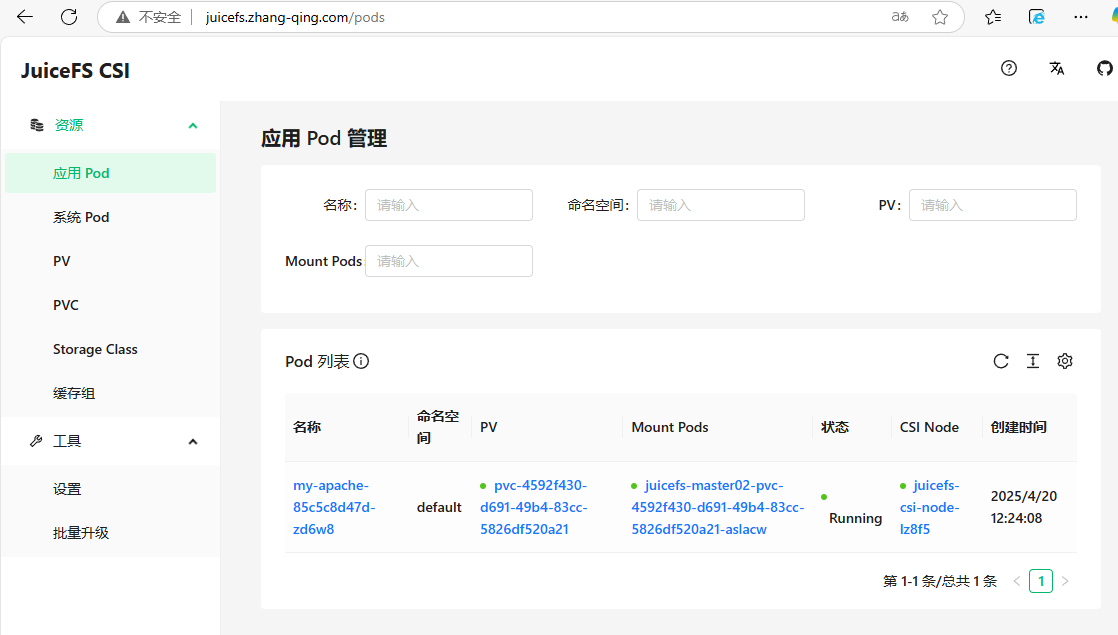
6.5 使用JuiceFS CSI Dashboard
JuiceFS CSI Dashboard 是一种针对 JuiceFS 在 Kubernetes 环境中使用的管理控制台工具,提供了可视化的监控和管理界面。
[root@master01 15]# vim jfs-ing.yaml
apiVersion: networking.k8s.io/v1
kind: Ingress
metadata:
  name: juifs-ingress
  namespace: kube-system
spec:
  ingressClassName: nginx
  rules:
    - host: <juicefs-dashboard-domain>
      http:
        paths:
          - backend:
              service:
                name: juicefs-csi-dashboard
                port:
                  number: 8088
            path: /
            pathType: Prefix

# 应用
[root@master01 15]# kaf jfs-ing.yaml
浏览器输入http://<juicefs-dashboard-domain>/进行访问
七、方案总结
采用 JuiceFS 作为 Kubernetes 和 MinIO 对象存储集成的解决方案,具备以下优势:
- 简化了多云和容器环境中的文件系统集成,实现与 MinIO 的标准接口兼容;
- 提供了动态、灵活的卷管理能力,适应 Kubernetes Pod 扩缩容需求;
- 优化了数据读写性能,确保在高并发场景下的 I/O 性能表现;
- 结合了 MinIO 的可扩展性和持久性,同时增强了数据安全保障措施,包括加密和细粒度权限控制;
- 简化了存储资源的管理和运维工作流程,提升了集群整体架构的灵活性和易用性。
更多 JuiceFS 社区版文档:https://juicefs.com/docs/zh/community/introduction/