

一、RedisShake能做什么
redis-shake是一个用于在两个 redis之间同步数据的工具,满足用户非常灵活的同步、迁移需求。 GitHub地址 : https://github.com/alibaba/RedisShake
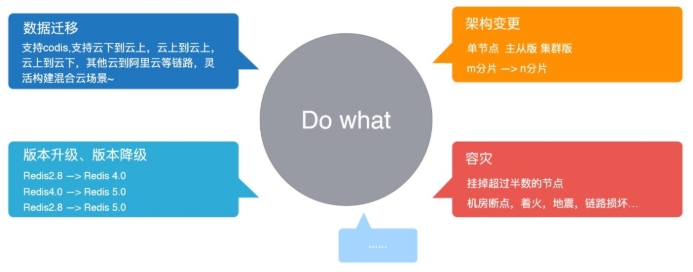
作用 &应用场景
- 数据迁移 &同步
- 版本变更
- 架构变更
- 容灾
- 多活
二、RedisShake基本原理
2.1 功能
RedisShake的主要功能有解析、恢复、备份、同步。
功能:
- 恢复 restore:将 RDB文件恢复到目的 redis数据库。
- 备份 dump:将源 redis的全量数据通过 RDB文件备份起来。
- 解析 decode:对 RDB文件进行读取,并以 json格式解析存储
- 同步 sync:支持源 redis和目的 redis的数据同步,支持全量和增量数据的迁移,以下主要介绍同步 sync。
2.2 基本同步模式
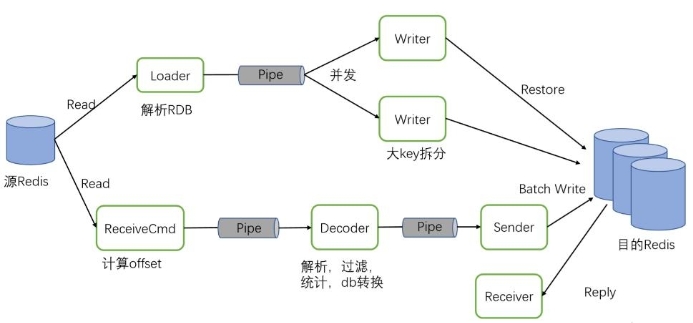
redis-shake的基本原理就是模拟一个从节点加入源 redis集群,首先进行全量拉取并回放,然后进行增量的 拉取(通过 psync命令)。如下图所示:
支持的 Redis形态:
(1)Standalone:单源拉取,主从版 /单节点
(2)Sentinel:从 Sentinel获取地址并拉取
(3)Cluster:开源 Cluster模式
(4)Proxy:从 Proxy拉取

2.3 sync模式数据流图
三、数据同步示例
3.1 数据同步
wget https://github.com/tair-opensource/RedisShake/releases/download/v3.1.11/redis-shake-linux-amd64.tar.gz
cd /data
tar zxvf redis-shake-linux-amd64.tar.gz -C redis-shake/
cd redis-shake/
配置文件
restore.toml scan.toml sync.toml
恢复
./redis-shake -conf=conf/restore.toml &
数据同步
./redis-shake -conf=conf/sync.toml &
3.2 示例:将一个单实例中的数据迁移至 cluster中
步骤流程:
创建 xx.toml配置文件 ---> 编写 toml配置文件同步规则 ---> 执行 redis-shake进程 ---> 核对 数据同步情况
#1、创建 &编写配置文件
$ cat /data/redis-shake/conf/sync-6400tocluster.toml
type = "sync"

[source]
version = 6.2 # redis version, such as 2.8, 4.0, 5.0, 6.0, 6.2, 7.0, ...
address = "127.0.0.1:6400"
username = "" # keep empty if not using ACL
password = "" # keep empty if no authentication is required
tls = false
elasticache_psync = "" # using when source is ElastiCache. ref: https://github.com/alibaba/RedisShake/issues/373

[target]
type = "cluster" # "standalone" or "cluster"
version = 6.2 # redis version, such as 2.8, 4.0, 5.0, 6.0, 6.2, 7.0, ...
# When the target is a cluster, write the address of one of the nodes.
# redis-shake will obtain other nodes through the `cluster nodes` command.
address = "127.0.0.1:6510"
username = "" # keep empty if not using ACL
password = "" # keep empty if no authentication is required

==说明==
## 1.x和2.x版本过滤
(1)如果需要迁移全部的key,则 filter.db = 空,如下:
filter.db =

(2)如果需要迁移某几个key,则分号分隔,如下:
filter.key = aaattt;hello

(3)迁移: Abc.Route前缀的key、aaa前缀的key
filter.key = Abc.Route;aaa

## 3.x版本过滤
使用lua脚本自定义过滤规则。Redis-shake可以用下面的命令启动:
./bin/redis-shake sync.toml filter/xxx.lua

#2、启动
./redis-shake conf/sync-6400tocluster.toml

#3、验证数据是否迁移完成
2023-06-17 19:05:28 INF send RDB finished. address=[127.0.0.1:6400], repl-stream-db=[0]

#4、新增数据验证cluster中是否存在
[root@OPS-9-78 ~]# redis-cli -p 6400 set qq 20230617
OK
[root@OPS-9-78 ~]# redis-cli -c -p 6510 get qq
"20230617"

注意:
clusterA -> clusterB: 将一个clusterA(3节点)中的数据迁移至clusterB中,需要把A集群当做3个单机实例,然后部署3个 redis-shake 进行数据同步。
四、redis-shake注意事项
如果目标库的数据淘汰策略( maxmemory-policy)配置为 noeviction以外的值,可能导致目标库的数 据与源库不一致
如果源库中的某些 Key使用了过期( expire)机制,由于可能存在 Key已过期但未被及时删除的情形,所以 在目标库中查看(如通过 info命令)到的 Key数量会比源库的 Key数量少