
一、使用Filebeat收集K8s日志
3.2.1 在K8s中一键部署Filebeat
参考链接:https://www.elastic.co/docs/deploy-manage/deploy/cloud-on-k8s/quickstart-beats
3.2.1.1 部署Filebeat
1、创建一个定义 Filebeat RBAC的 Yaml 文件
[root@k8s-master01 eck]# vim filebeat-rbac.yaml
apiVersion: v1
kind: ServiceAccount
metadata:
  name: filebeat
  namespace: logging
---
apiVersion: rbac.authorization.k8s.io/v1
kind: ClusterRole
metadata:
  name: filebeat
rules:
- apiGroups: [""]
  resources: ["namespaces", "pods", "nodes", "services"]
  verbs: ["get", "list", "watch"]
- apiGroups: ["apps"]
  resources: ["daemonsets"]
  verbs: ["create", "get", "update"]
---
apiVersion: rbac.authorization.k8s.io/v1
kind: ClusterRoleBinding
metadata:
  name: filebeat
roleRef:
  apiGroup: rbac.authorization.k8s.io
  kind: ClusterRole
  name: filebeat
subjects:
- kind: ServiceAccount
  name: filebeat
  namespace: logging
2、应用
[root@k8s-master01 eck]# kaf filebeat-rbac.yaml
3、创建一个定义 Filebeat 的 Yaml 文件
[root@k8s-master01 eck]# vim filebeat.yaml
apiVersion: beat.k8s.elastic.co/v1beta1
kind: Beat
metadata:
  name: filebeat
spec:
  type: filebeat
  version: 8.17.0
  image: registry.cn-hangzhou.aliyuncs.com/github_images1024/filebeat:8.17.0
  config:
    output.kafka:
      hosts: ["kafka:9092"]
      topic: '%{[fields.log_topic]}'
      #topic: 'k8spodlogs'
    filebeat.autodiscover.providers:
      - node: ${NODE_NAME}
        type: kubernetes
        templates:
          - config:
              - paths:
                  - /var/log/containers/*${data.kubernetes.container.id}.log
                tail_files: true
                type: container
                fields:
                  log_topic: k8spodlogs
                processors:
                  - add_cloud_metadata: {}
                  - add_host_metadata: {}
              - add_cloud_metadata: {}
              - add_host_metadata: {}
              - drop_event:
                  when:
                    or:
                      - equals:
                          kubernetes.container.name: "filebeat"
  daemonSet:
    podTemplate:
      spec:
        serviceAccountName: filebeat
        automountServiceAccountToken: true
        terminationGracePeriodSeconds: 30
        dnsPolicy: ClusterFirstWithHostNet
        hostNetwork: true # Allows to provide richer host metadata
        containers:
          - name: filebeat
            securityContext:
              runAsUser: 0
              # If using Red Hat OpenShift uncomment this:
              #privileged: true
            volumeMounts:
              - name: varlogcontainers
                mountPath: /var/log/containers
              - name: varlogpods
                mountPath: /var/log/pods
              - name: varlibdockercontainers
                mountPath: /var/lib/docker/containers
              - name: messages
                mountPath: /var/log/messages
            env:
              - name: NODE_NAME
                valueFrom:
                  fieldRef:
                    fieldPath: spec.nodeName
        volumes:
          - name: varlogcontainers
            hostPath:
              path: /var/log/containers
          - name: varlogpods
            hostPath:
              path: /var/log/pods
          - name: varlibdockercontainers
            hostPath:
              path: /var/lib/docker/containers
          - name: messages
            hostPath:
              path: /var/log/messages
4、创建 Filebeat
[root@k8s-master01 eck]# kubectl create -f filebeat.yaml -n logging
5、状态查看
# 查看
[root@k8s-master01 eck]# kg beat -n logging
NAME       HEALTH   AVAILABLE   EXPECTED   TYPE       VERSION   AGE
filebeat   green    3           3          filebeat   8.17.0    22m

# 查看pod
[root@k8s-master01 eck]# kubectl get po -n logging | grep filebeat
filebeat-beat-filebeat-9zqq4   1/1     Running   0          22m
filebeat-beat-filebeat-glkq6   1/1     Running   0          22m
filebeat-beat-filebeat-spj2h   1/1     Running   0          22m
3.2.1.2 部署Filebeat遇到的问题
问题描述:当执行kubectl create -f filebeat.yaml -n logging命令后没有生成Filebeat服务
# 查看ds
[root@k8s-master01 eck]# kg ds -n logging
NAME                     DESIRED   CURRENT   READY   UP-TO-DATE   AVAILABLE   NODE SELECTOR   AGE
filebeat-beat-filebeat   3         0         0       0            0           <none>          12m
# 查看pod
[root@k8s-master01 eck]# kgp -n logging | grep filebeat

# 查看beat
[root@k8s-master01 eck]# kubectl get  beat filebeat -n logging
NAME       HEALTH   AVAILABLE   EXPECTED   TYPE       VERSION   AGE
filebeat   red                  3          filebeat             3s
问题原因:没有创建sa
[root@k8s-master01 eck]# k describe ds filebeat-beat-filebeat  -n logging
...
...
Events:
  Type     Reason        Age                   From                  Message
  ----     ------        ----                  ----                  -------
  Warning  FailedCreate  2m54s (x18 over 13m)  daemonset-controller  Error creating: pods "filebeat-beat-filebeat-" is forbidden: error looking up service account logging/filebeat: serviceaccount "filebeat" not found
问题解决:
# 删除之前创建的filebeat
[root@k8s-master01 eck]# kubectl delete -f filebeat.yaml -n logging

# 定义sa相关资源
[root@k8s-master01 eck]# cat filebeat-rbac.yaml
apiVersion: v1
kind: ServiceAccount
metadata:
  name: filebeat
  namespace: logging
---
apiVersion: rbac.authorization.k8s.io/v1
kind: ClusterRole
metadata:
  name: filebeat
rules:
- apiGroups: [""]
  resources: ["namespaces", "pods", "nodes", "services"]
  verbs: ["get", "list", "watch"]
- apiGroups: ["apps"]
  resources: ["daemonsets"]
  verbs: ["create", "get", "update"]
---
apiVersion: rbac.authorization.k8s.io/v1
kind: ClusterRoleBinding
metadata:
  name: filebeat
roleRef:
  apiGroup: rbac.authorization.k8s.io
  kind: ClusterRole
  name: filebeat
subjects:
- kind: ServiceAccount
  name: filebeat
  namespace: logging

# 重新创建
[root@k8s-master01 eck]# kaf filebeat-rbac.yaml
[root@k8s-master01 eck]# kubectl create  -f filebeat.yaml -n logging
3.2.2 使用Kibana查询K8s日志
打开浏览器,输入http://10.0.0.20:30502/,账号密码为elastic/8kry7pp6hWP0Vd65z688Pni6登录Kibana后
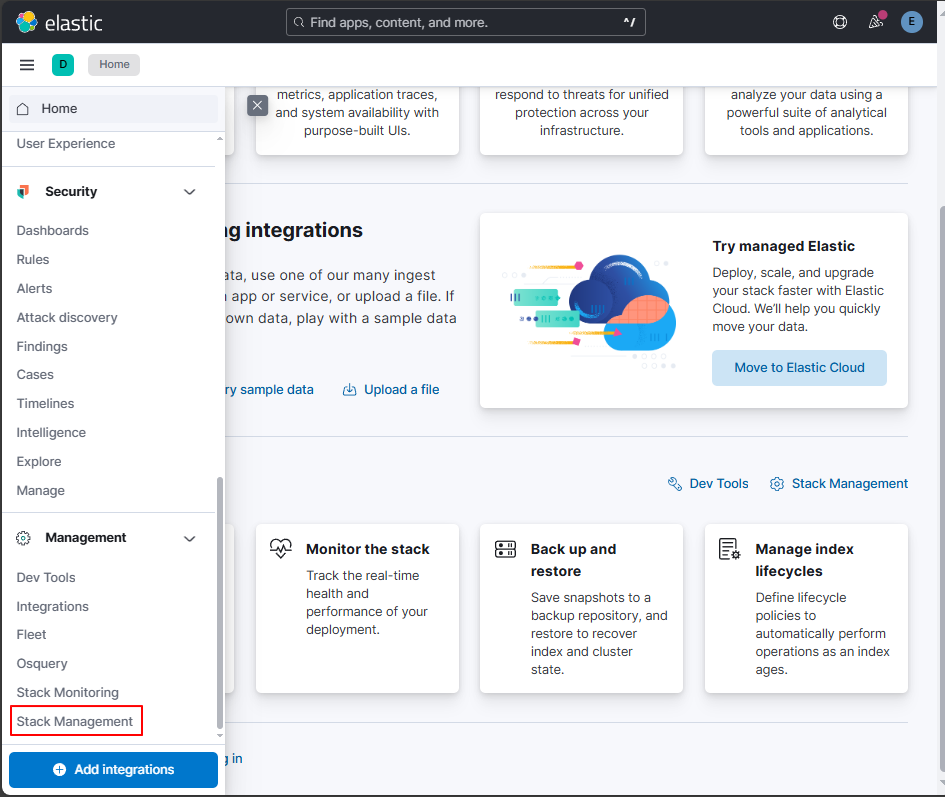
1、点击【Stack Management】
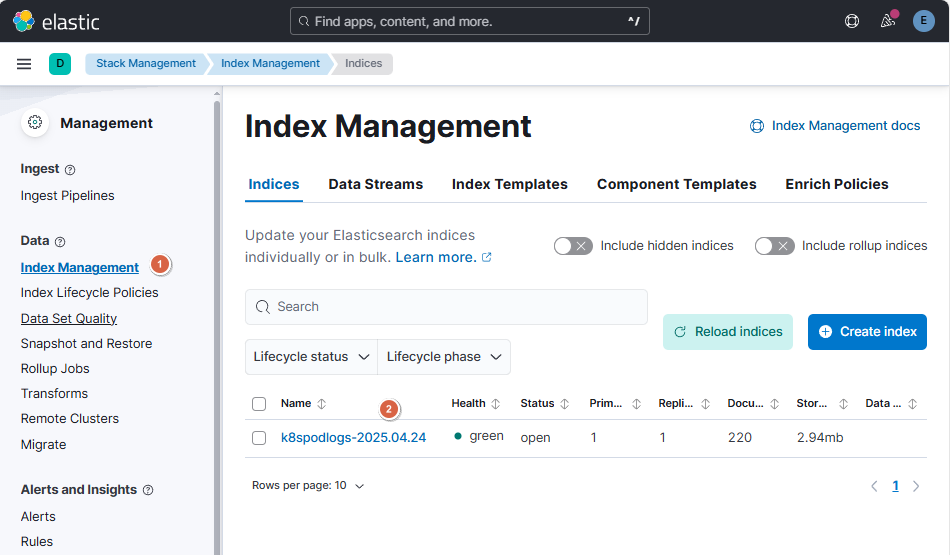
2、点击【Index Management】
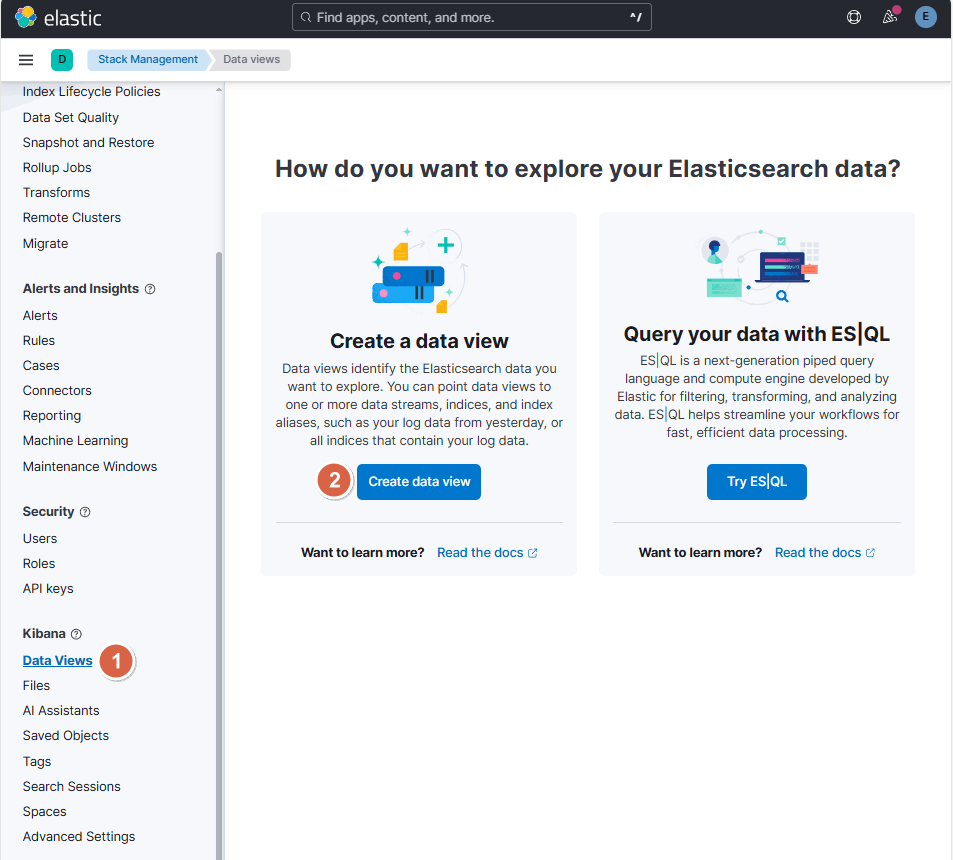
3、点击【Data Views】-【Create data view】
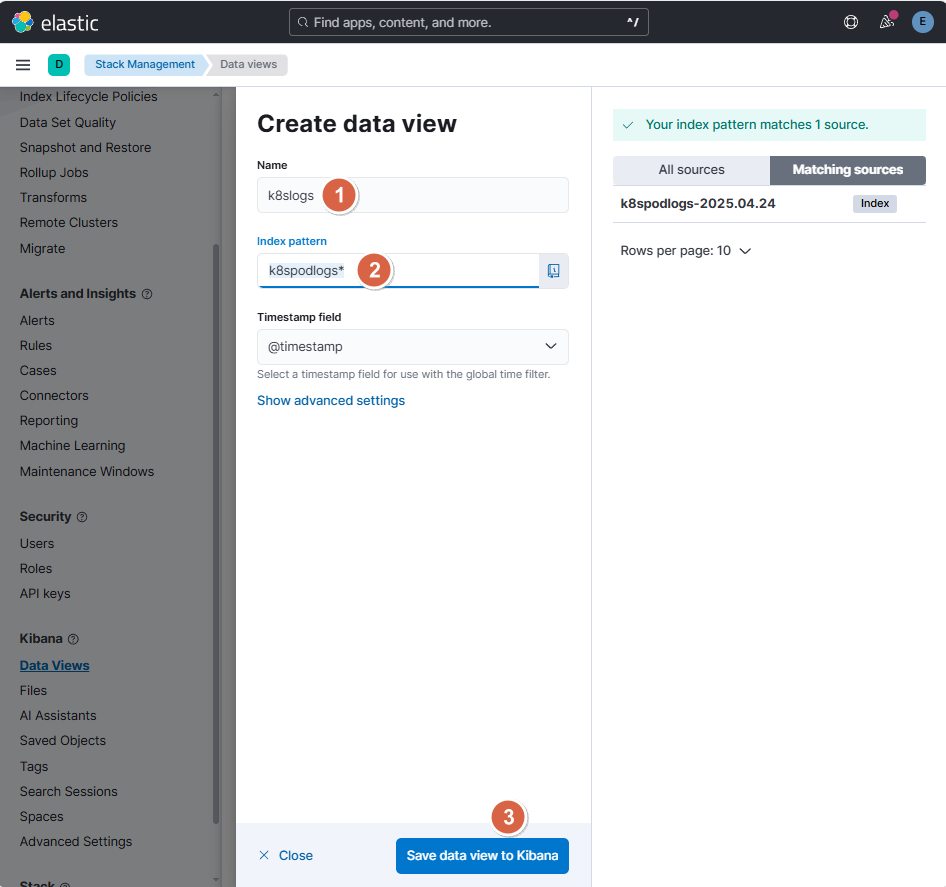
4、定义相关信息后,点击【Save data view to Kibana】
- Name:k8slogs
- Index pattern:k8spodlogs*
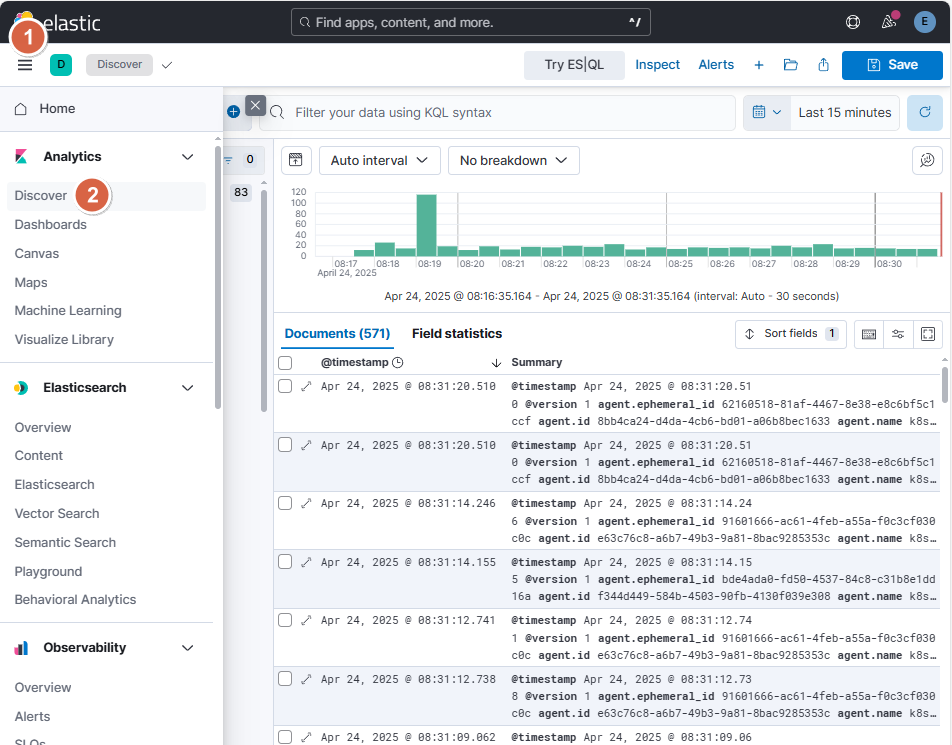
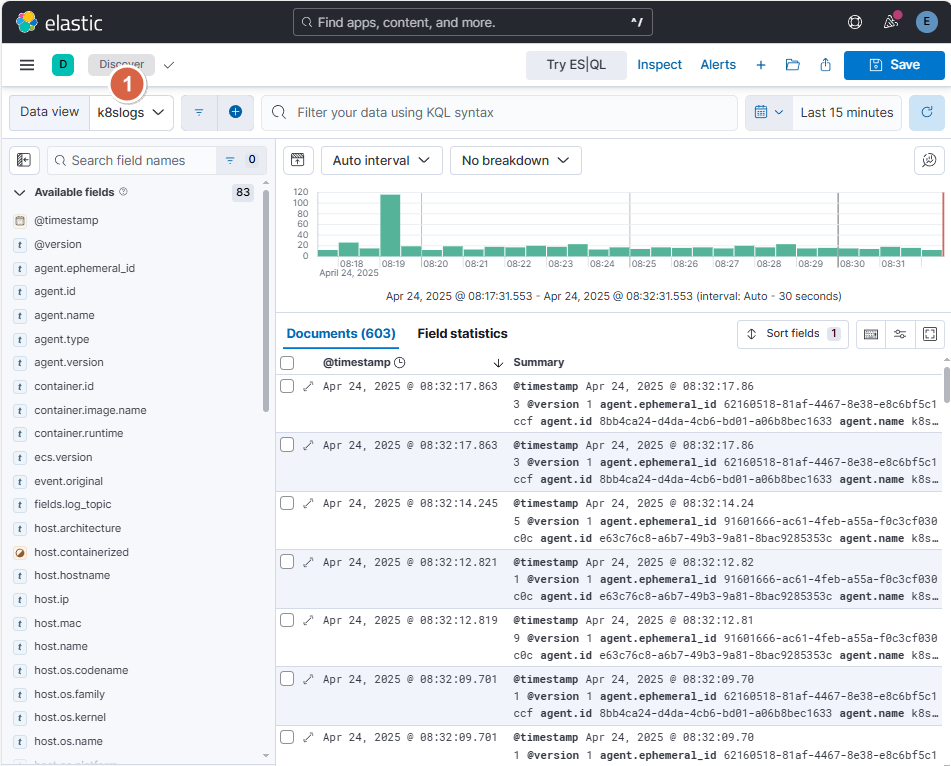
5、点击【Discover】,选择【k8slogs】即可查看到相关日志信息